<![CDATA[The Future Is Now]]>2025-01-23T16:45:56-08:00http://mistys-internet.website/blog/Octopress<![CDATA[What You Might Miss When Backing Up CDs]]>2025-01-23T16:39:24-08:00http://mistys-internet.website/blog/blog/2025/01/23/what-you-might-miss-when-backing-up-cdsI’ve written a bit recently about CD-ROM preservation and some of the more niche, easily-missed parts of the format. I’ve covered the formats themselves, but I felt it might help to provide some concrete examples of the kind of data that can easily be missed and that might not get backed up.
As I mentioned in a previous post, many CD disc image formats don’t include the disc’s subcode data1. Most discs don’t use it for any non-structural data, and in the cases where it’s used for copy protection it’s immediately obvious that it’s needed since the backed up software won’t work. There are cases that are subtler, however, and where actually significant data in the subcode can be missed.
CD+G is an extension to the Compact Disc format that allows displaying simple graphics alongside the audio content of a CD. It comes well before CD-ROM, so it’s designed for CD players that are hooked up to a TV rather than computers. CD+G stores its graphics in the disc’s subcode data, which means that only backups that include that data actually capture the full content of the disc. Back up a CD+G disc in a format that doesn’t include subcode data, like BIN/CUE, and it just turns into a normal audio CD. These graphics can be used for anything; the first CD+G release, Firesign Theatre’s 1985 comedy album (shown above) features illustrations to accompany the audio. It was never widely-used, but it did develop a significant niche in karaoke discs as a way to display lyrics on-screen.
I want to talk a little more about how easy it can be to miss that a disc has significant CD+G data, so let’s take a look at a few practical examples. A simple example is the Firesign Theatre album mentioned above. The packaging, as seen on Discogs, doesn’t mention the CD+G content at all, aside from a brief reference in the album credits—most owners of this disc would have no idea the CD+G content existed, and would never have owned a player. It’s very likely that most people backing up their disc wouldn’t even know they had skipped some of its content.
That’s a little too simple, though. A little too neat and tidy. Let’s take a look at something more fun.
In the 16-bit era, the first CD-based game consoles all had support for playing music CDs as a bonus feature. Many of these consoles also supported CD+G, and for many families these would have been their only CD+G player. The Victor Wondermega, a high-end all-in-one Sega Mega Drive/Mega CD console released in Japan, leaned into CD+G’s popularity as a karaoke format by making karaoke one of its major features—including two microphone ports built right into the console. The system was bundled with a pack-in CD called Wondermega Collection that showed off all aspects of its features: it includes several minigames that can be played in Mega CD mode, and two karaoke audio tracks that can be played if the player boots into the system’s CD player instead of the game.
Screenshots of two disc images of Wondermega Collection running in the same CD player. The screenshot on the left is played without the subcode information, so it's recognized as audio-only. The screenshot on the right is played with the subcode information, so the CD+G content is correctly identified and rendered during playback.
Those karaoke tracks are coded using CD+G2, which means that they’re only properly backed up if the disc is ripped in a format which supports subcode data. And, because of the complexity of the disc, there are many reasons that it’s easy to fail to notice that this data was missed:
Since the disc contains both Mega CD and audio CD content, the audio CD portion could easily be missed when testing the backup. In this case, it’s easy to miss that the audio CD tracks actually had unique content beyond the audio itself.
Not all Mega CD emulators support subcode data, so it may not be clear how to even test that the disc is complete or incomplete.
The Redump standard doesn’t include subcode data in the set of data it validates3, so those backing up their discs to match Redump’s database may discard the subcode data without realizing that it’s significant.
So what’s the lesson here? Well, first of all, it’s simply that it’s difficult to fully audit all of the content on a disc to confirm that a backup is fully functional. The more kinds of distinct content on a disc, as in our Wondermega Collection example, the harder. (This is similar to the example of Mac/Windows hybrid discs I gave in my previous post, where by only testing a backup on one operating system an archivist might miss that they had discarded data for the other.) The second lesson is that it’s not always obvious what content even exists on a disc, and it’s easy to throw something away simply by not knowing it existed in the first place.
My personal recommendation, for those creating raw disc backups of physical CDs, is simply to always store the subcode data—at only 4% the size of the disc’s primary data, it adds very little extra storage burden in exchange for being sure that nothing is being lost. For the truly storage space-starved, it’s worth at least doing a full audit to make sure that no CD+G, CD-TEXT or similar data is present before discarding subcode data.
Which, yes, means they do work on any CD player that supports CD+G, including regular karaoke CD players.↩
This isn’t out of ignorance—there are technical limitations that make it difficult to validate the fixity of subcode data. Redump’s database only includes data that can be reliably reproduced; omitting subcode data doesn’t mean that it’s not significant or that it shouldn’t be backed up along with the rest of the disc’s content, just that it can’t be validated in the same way that the disc’s main contents can be.↩
]]><![CDATA[Announcing Cue2ccd: A Tool to Convert BIN/CUE Disc Images to CloneCD]]>2024-12-15T14:59:56-08:00http://mistys-internet.website/blog/blog/2024/12/15/announcing-cue2ccd-a-tool-to-convert-bin-slash-cue-disc-images-to-clonecdI’m releasing a tool I wrote for myself: cue2ccd, a commandline tool to convert CD-ROM disc images from the BIN/CUE format to the CloneCD format. For as many disc image conversion tools as there are out there, I hadn’t found anything open-source or cross-platform that can handle going between these two specific formats—so I wrote it myself.
This is a very niche tool, but it solves one specific problem I have. I own a Rhea optical drive emulator for the Sega Saturn, a device which replaces the original CD drive in the console and allows it to load media from disc images on an SD card instead of physical CDs. The Rhea’s great in a lot of ways, but it has one specific limitation: it doesn’t load games in the BIN/CUE disc image format1. Since a lot of media online is in that format, I’ve really been wanting a convenient way to convert existing BIN/CUE images I have lying around into something I can use. Given how niche this is I don’t expect many other people to need it, but I hope it’s helpful if there’s anyone else in the same situation.
Usage is as simple as possible: just run cue2ccd path_to_cuesheet.cue and it’ll produce new .img, .ccd and .sub files in the same directory, ready for use. I’ve set up convenient commandline installers for installing it on Mac, Linux, and Windows, which are available from the website, and it can be installed using Homebrew by running brew install mistydemeo/formulae/cue2ccd.
From here, I’d like to take a little dive into the details of what this kind of conversion looks like and what I needed to do. I’m not planning to go into my specific implementation, but rather I’d like to focus on the details of the formats and the problems I ran into when writing cue2ccd. If you don’t care about the technical details, you can skip the rest of the post (but please enjoy the tool, if you use it!). There are three primary things I needed to handle: writing CloneCD control files (.ccd), writing subcode data (.sub), and merging multi-track images.
Writing CloneCD control files
Like I mentioned in a previous post, CloneCD’s table of contents format is lower-level and much more complex than the cue sheets used by BIN/CUE disc images. Here’s a sample cue sheet for a disc image with one data track and two audio tracks:
123456789
FILE "disc.bin" BINARY
  TRACK 01 MODE1/2352
    INDEX 01 00:00:00
  TRACK 02 AUDIO
    INDEX 00 00:04:16
    INDEX 01 00:06:16
  TRACK 03 AUDIO
    INDEX 00 00:07:16
    INDEX 01 00:09:16
These nine lines capture (most of) the essential parts of a CD, without getting into details: it lists which tracks exist (and which files those tracks are stored in); what type and mode each of those tracks are; and that track’s indices, with their locations on the disc.2
The equivalent CloneCD file, meanwhile, is 121 lines long and contains entries that look like this:
And it continues from there—as you can imagine, it’s a much more complex format to generate! At its core, though, they’re both representing roughly the same information: the table of contents of a disc, with the tracks and their definitions. All of the information I need to generate the CloneCD files either exists in the cue sheet or can be derived based on information I have access to. This data fits into three categories, one of which is data shared in common between cue sheets and the CloneCD format:
Data about each track, including its list of indices and start/stop timestamps3
Overall data about the disc and the session (missing from the cue sheet)
Data about the disc’s lead-in and lead-out sections (missing from the cue sheet)
Track-level metadata
That’s a lot to go over, but this turned out not to be as complex as I thought it might be. I’ll gloss over the disc-level metadata (which is fairly brief); let’s look at what the two formats share in common instead, the track-level metadata. We’ll do direct comparison of the same track from both the cue sheet and the CloneCD file, starting with the cue sheet:
12
TRACK 01 MODE1/2352
  INDEX 01 00:00:00
Despite being fairly short, it encodes a few different bits of information that we’ll be wanting to reproduce.
This is track 1 on the disc;
It’s a data track, specifically a mode 1 data track.4
That data track is stored in the disc image with “raw” 2352-byte sectors, meaning error correction is included. This field isn’t important for us, since cue2ccd only works with raw disc images.
This track contains a single index, numbered 1, which begins at the timestamp 00:00:00—that is, at the very beginning of the disc image.
It’s all, in other words, pretty core structural metadata about the track and how it’s formed. Now let’s take a look at the CloneCD version:
At first glance, it looks pretty overwhelming! It turns out, however, it’s not actually as complex as it seems. The field names may seem difficult to understand at first flance, but the good news is that they’re based directly on the table of contents from the lead-in on a real CD, and so all of them (with the same or similar names) are documented in the CD spec.
The Point (pointer) field is a hex value which means a few different things depending on context. For a standard track, it’s the track number. In this case, we know from the cue sheet that this is track 1, so it’s set to 1.
The Control field is a hex value which indicates information about the track type, along with some other metadata that isn’t relevant to us. This is four bits out of a byte in the CD’s binary format, but CloneCD lets us just write a number. There are only two values that matter to us: audio (0) or data (4). We’ve got a data track, so this uses 4.
The track starts at 00:00:00, so we mark the same values here. They’re just in three separate fields, unlike the cue sheet where they’re written as a single timestamp. We get PMin=0, PSec=2 and PFrame=0. (If that seems like an off-by-two value to you, well-spotted. The explanation comes later.)
The PLBA field contains essentially the same information as in the Min/Sec/Frame fields, but expressed in terms of the number of sectors since the beginning of the disc’s content. In this case, this track begins at the start of the disc, so that’s 0.
The AMin, ASec and AFrame values mean something in other contexts, but here are left at zero.
The Zero field always contains a 0. What a surprise!
Finally, a few fields aren’t relevant to us and get hardcoded, like Adr and TrackNo.
Whew! In other words, this is mostly the same data as in the cue sheet, it’s just in a more verbose form and using terms that only make sense after reading the CD-ROM spec. Knowing what these fields mean, it wasn’t too hard to generate these CloneCD tracks given the equivalent information from the cue sheet.
Lead-in and lead-out
I mentioned earlier that the CloneCD format includes information about the lead-in and lead-out. These are sections at the beginning and end of the disc that aren’t typically stored, in their raw format, in disc images. The lead-in contains the raw, binary table of contents information for the disc while the lead-out contains information about the disc’s duration.
This is missing from the cue sheet format, but we can derive the info we need from what’s in the CloneCD data. These are stored as “entries” in the CloneCD control file alongside the tracks, and actually looks a lot like track data. The fields share names with the ones used for track data, but some of them take on different meanings when used like this.
To give you an idea what this looks like, here’s an abbreviated copy of the first/last track information for this disc with only the fields that differ from regular track data.
The Point field is the POINTER field defined in 22.3.4.2 of the CD-ROM spec. Previously, when talking about tracks, we set this to the track number. When set to a value outside the 1-99 track number range, it means something different. Two of those values can be seen above: 0xa0 means that this entry contains information about the first track on the disc, while 0xa1 means the last track. When set to these values, it changes the meaning of the remaining fields. Instead of containing timing information, the PMin field is used to specify the track number of the first or last track on the disc, and the other two values are left empty. These two fields tell the player how many tracks to expect when reading the rest of the disc. The PLBA fields are still here, and still calculated based on the Min/Sec/Frame values, but they’re essentially meaningless for these entries since the Min/Sec/Frame aren’t real timestamps.
Finally, we get to the lead-out, which looks like this (relevant fields only):
12345
[Entry 2]
Point=0xa2
PMin=0
PSec=12
PFrame=16
A pointer of 0xa2 indicates that the remaining values are describing the beginning of the disc’s lead-out—or, in other words, describing the end of data. Here, the Min/Sec/Frame values are a timecode again, but instead of describing the start of a section of data, they describe the timestamp marking the end of the disc. (Yes, 12.21 seconds is accurate; this is a small test image containing three seconds-long tracks.) This is actually pretty critical info: it tells the CD player when it should stop seeking at the end of the CD, and makes it possible to tell how long the disc is as a whole.
Parsing and oddities
I went for libcue for parsing cue sheets, since it provides a simple and straightforward track-oriented interface which makes it easy to query all of the track definitions. Writing my own parser in Rust felt out of scope. There are a couple of pure-Rust parsers on crates.io, but they’re oriented around music files like FLAC and are missing a few features I’d need for raw disc images. Instead, I wrote a small crate that acts as a thin binding for libcue while adapting a few bits of its interface to Rust conventions.
One of the more annoying gotchas of the cue sheet format is that it leaves out one important piece of information that’s necessary to render the lead-out entry. Let’s take another peek at the cue sheet, and see if it jumps out at you.
123456789
FILE "disc.bin" BINARY
  TRACK 01 MODE1/2352
    INDEX 01 00:00:00
  TRACK 02 AUDIO
    INDEX 00 00:04:16
    INDEX 01 00:06:16
  TRACK 03 AUDIO
    INDEX 00 00:07:16
    INDEX 01 00:09:16
It lists where tracks and indices start… but it doesn’t show where they end. libcue calculates track ends for every track except the last by checking where the next index starts, and returns that with the rest of the information that’s in the file, but the duration and endpoint of the final track is left completely ambiguous. The only way to get that information is to check the file size of the actual underlying disc image file and calculate how many sectors long it is. It’s not the end of the world, but it is annoying—and it’s the one and only bit of metadata generation I did that required access to the underlying data files. I would have loved if I could have worked just off of the metadata.
Another interesting gotcha is the timestamps, which have an unusual off-by-150 problem. As I mentioned previously, the lead-in and lead-out sections are usually omitted from the binary content of a disc image. Since the lead-in takes up the first 150 sectors on the disc, this means that standard disc images actually start at index 150 into the disc, not index 0. This gives us an conundrum for absolute timestamps. Although the BIN/CUE images appear at first glance to have absolute timestamps that are comparable with the CloneCD file, its definition is slightly different.
With a single BIN file, a cue sheet’s indices are absolute indices into the BIN file. Since the first index within the BIN file is actually sector 150 on the disc, it means that the timecodes for that BIN file are offset from the real CD by 150. Let’s take another look at some absolute timestamps for the two formats for a practical example:
12
TRACK 02 AUDIO
  INDEX 01 00:06:16
123
PMin=0
PSec=8
PFrame=16
This track on our sample image begins at 00:06:16 into the BIN/CUE… which means that, for CloneCD, it has an absolute timestamp of exactly two seconds more, 00:08:16. In practice, applying an offset when translating timestamps wasn’t actually that hard, but it was a place where where errors seeped in. For a nontrivial part of my tool’s life, I had an off-by-one error from sloppy timestamp conversion.
Generating subcode data
The second thing I needed to create was subcode data (aka subchannel data), a form of builtin metadata used on CD. On physical CDs, each 2352-byte sector is accompanied by 98 bytes of subcode data. The subcode data is necessary when reading a physical CD but not typically needed when mounting or burning a disc image, so a number of disc image formats—including BIN/CUE and plain ISO files—don’t bother reading or saving it at all. The CloneCD format does back it up, however, and the device I’m using requires valid subcode data. I knew I’d need to generate it myself.
Subcode data is a binary format encoding very similar information to the entries we just saw in the text-based CloneCD control format above. Each 98-byte subcode sector contains two bytes of synchronization words, followed by 96 bytes of data divided into eight channels with lettered names from P to W. In the original CD and CD-ROM specs, only the P and Q channels are specified; channels R through W were set aside for later expansion, and most discs never use them. They were used for standards such as CD-TEXT, which allowed encoding human-readable track names on a CD; CD+G, which allowed encoding simple graphics, such as on karaoke CDs; and various copy protection systems. For my usecase, none of those were relevant, so I only needed to generate data for the P and Q channels.
P channel
The P channel was by far the simplest, and took very little work to do. It’s used to indicate the boundaries between tracks for very primitive early players which didn’t keep track of table of contents information. If a sector is within the first 150 sectors of the start of a track, it’s filled with FF bytes. Otherwise, it contains 00 bytes. There’s no other variation, so it was very easy to implement.
Q channel
The Q channel is slightly more complex. Before getting into the details, let’s look at a little sample of what a single Q channel sector looks like. Here’s the raw bytes in hex format:
1
41010100 00480000 0248F2BB
There’s a chance you may be able to put together some of this based on the description of the entries in a CloneCD control file earlier, but don’t worry, we’ll come back to this later.
This channel primarily consists of timing information: it encodes the timestamp of the currently-playing sector, a flag indicating whether this sector is data or audio, and some simple forms of metadata5. It also contains a 16-bit checksum, allowing the data in the rest of the Q channel to be validated. The metadata in question isn’t relevant to my usecase, so I only needed to worry about the timestamps, the data flag, and the checksum.
Control and q-Mode fields
The first byte is separated into two four-bit fields. That is, it contains data which is smaller than one byte—an idea that isn’t always familiar to people who aren’t familiar with binary data. Since a byte contains eight bits, it’s possible to fit multiple fields into a single byte if they’re smaller than one byte. In this case, instead of using the full byte for one field, we can split that one byte in half and use it to store two four-bit fields.
The first of these fields, the control field, consists of a few different flags, but only one is relevant here: the data flag. When unset, it indicates that this sector contains audio; when set, it indicates that it contains data. In our case, that means taking the first four bits of our byte and setting them to 0100.
The second field indicates the type of data being encoded in the following bytes. Since I’m ignoring the alternate metadata that could be represented here, I always set it to the value indicating that the bytes to follow will contain timing information. In our case, that means taking the last four bits of our byte and setting it to 0001. Putting it all together, we get a byte with the bits:
1
01000001
Or, read as a single byte:
1
41
Timestamps
As with the CloneCD control file, timestamps are stored as separate minute, second and fraction fields. The Q channel contains two different timestamps and some other timekeeping information:
The track number
The index number
The timestamp relative to the current track
The absolute timestamp
All of these values are stored in binary-coded decimal (BCD) format, which has the side bonus that it makes this data easy to read by eye with a hex editor. I made use of that while debugging.
For the most part, these timestamp fields are straightforward to implement so long as I pass the right data in. There was one fun gotcha, however. CD audio contains gaps between tracks called “pregaps”; they’re defined as index 0 within a track, with the track itself beginning at index 1. They throw an interesting edge case for calculating relative timestamps. What does it mean to track the timestamp relative to the start of the track for a time that isn’t part of the track? Since this binary-coded digital format doesn’t support negative numbers, the standard uses a slightly strange but appropriate workaround. Within the pregaps, the relative timestamp instead starts at the length of the pregap and then counts down until it hits 0, which marks the beginning of the track, at which point it begins counting up again. Needless to say, this was the source of a few fun off-by-one bugs.
Checksum
Finally, it ends with a 16-bit (two-byte) checksum of the remainder of the data. The CRC-16 routine it uses is specified in the CD-ROM spec; I generated a suitable C CRC-16 routine using the Ruby crc library, then translated it into Rust. I’ve published it standalone as the cdrom_crc crate.
Putting it all together
Here’s that raw data again, with each byte annotated:
12345678910111213141516171819202122
41 - This one byte is actually two different fields,
     each of which takes up four bits.
     The first four bits are the control field;
     here, 0100 indicates this is a data track.
     The next four bits are are the Q-mode field.
     0001 indicates the remainder of the data is time
     information.
01 - This is the track number - track 01.
01 - This is the current index - index 01.
00 - These next three bytes make up the relative
     position of this sector within the track,
     00:00:48.
00
48
00 - This is the zero field. It's always zero.
00 - These next three bytes make up the absolute
     position of this sector on the disc,
     00:02:48.
02
48
F2 - These last two bytes are the 16-bit checksum.
BB
Not actually that much information, and not too hard to make sense of after taking the time to assemble everything, but it certainly took some work to get there.
Luckily for me, the CloneCD representation of subcode data is simplified in a few ways that made things easier. CloneCD ignores the two sync bytes, storing only the 96 data bytes, which saved me the trouble of handling them. It also reorders the data to be easier to reason about. On a physical CD, the subcode for a sector isn’t contiguous. Instead, every 32-byte frame of a data sector is followed by a single byte containing one single bit from each of the eight channels. Assembling a complete byte for the channels requires waiting for eight frames and reordering the bits as they come in. CloneCD, meanwhile, reorders the data into the standard byte order. There may be technical reasons why this is the case when streaming from a CD, but I’m just grateful to get to write bytes like a normal person.
Merging disc images
I actually had a version of cue2ccd ready to release about a year ago, but I had one last feature I really wanted and kept putting off: merging disc images.
More specifically, I wanted to handle disc images containing multiple files. A lot of BIN/CUE disc images use a single BIN file containing all tracks, sort of like how a CD itself is structured, and that’s what the initial version of cue2ccd was written for. In recent years, however, split images have become more common. These are still raw images, but they use separate raw disc image files for every track on the disc. In theory, doing this is easy; the data is the same, you just need to concatenate the files. No work at all. Unfortunately, the metadata is a bit harder. Let’s take a look at the disc from earlier in its original one-file version:
123456789
FILE "disc.bin" BINARY
  TRACK 01 MODE1/2352
    INDEX 01 00:00:00
  TRACK 02 AUDIO
    INDEX 00 00:04:16
    INDEX 01 00:06:16
  TRACK 03 AUDIO
    INDEX 00 00:07:16
    INDEX 01 00:09:16
Now let’s take a look at the exact same disc, but in a one-file-per-track form:
1234567891011
FILE "disc (Track 01).bin" BINARY
  TRACK 01 MODE1/2352
    INDEX 01 00:00:00
FILE "disc (Track 02).bin" BINARY
  TRACK 02 AUDIO
    INDEX 00 00:00:00
    INDEX 01 00:02:00
FILE "disc (Track 03).bin" BINARY
  TRACK 03 AUDIO
    INDEX 00 00:00:00
    INDEX 01 00:02:00
It may strike you that those timestamps aren’t useful. And you wouldn’t be entirely wrong. They’re all the same now! What the heck? What happened?
Well, as I (briefly) mentioned earlier, the timestamps in a cue sheet are timestamps into that file, not absolute timestamps into the disc. For a single-file disc image there’s almost no difference between the two, except the off-by-150 issue I mentioned previously. But if a single binary also contains a single track, it suddenly becomes a lot more obvious that the offsets for each track are specific to each file.
So, in practice, implementing this didn’t just mean concatenating the files. It also meant, for each track, keeping track of the size of the disc up until that point so that I could convert each of these relative timestamps into an absolute one. It’s not necessarily hard work but it’s an easy source of off-by-one errors and other similar mistakes, so I had a few revisions with subtly wrong timing. It also runs into a harsher version of the “no duration of the last track” problem: since every track is its own file, now every track is the last track in its file, so none of them have durations available from the metadata. I was able to apply what I’d already written to calculate the duration based on the filesize, with a fix for a bug that only happened when it wasn’t the last track in a larger file, but I’d certainly have preferred not to have to do it at all.
In conclusion: CD is weird
Honestly, it’s been fun to get to dig deeper into a format not many people still care about these days. I’d also like to thank a couple of people whose help with previous projects was very useful for this one: the creator of the Rhea, Phoebe and GDEmu hardware, who was gracious in providing support debugging my earliest attempts at generating files compatible with his hardware; and CyberWarriorX, with whom I worked on an earlier CloneCD-generating project.
It also supports a few other formats, such as DiscJuggler and Alcohol 120%, but there aren’t any open-source tools to convert to those either.↩
Each track is divided into one or more indices. Index 1 is the actual start of the track, while index 0 defines a gap that comes before the actual track begins, and indices 2 and beyond are rare. The gap between tracks is typically called a “pregap”. On a real CD player, when picking a track by number, the player will start straight from that track’s index 1. When letting the disc play through from a previous track, however, the disc will play the pregap defined in index 0 first before proceeding to index 1.↩
Since CD was originally designed just for music, all indices to locations on the disc are measured in terms of timestamps instead of a more data-oriented index like an address in bytes. These timestamps are stored in three parts: minutes, seconds, and 1/75 fractions of a second. For example, if a track starts at two seconds into the disc, its timestamp is 00:02:00. libcue translates these into a logical block address, eg a number of sectors, which would mean the previous example is 150. The CloneCD format reproduces the original CD-ROM spec’s timestamps, but additionally stores logical block addresses in some places for convenience.↩
There are a few different modes of data track which have different data layouts. A data sector is always 2352 bytes with a mixture of data and error correction data. The different modes have different ratios of data to error correction. Mode 1, the original and most common mode, uses 2048 bytes out of every sector for data with the remaining 304 bytes serving as error correction.↩
It’s also used in the disc’s lead-in and lead-out, but I’m not dealing with those sections of the disc.↩
]]><![CDATA[What Happened to the Japanese PC Platforms?]]>2024-09-21T14:01:19-07:00http://mistys-internet.website/blog/blog/2024/09/21/what-happened-to-the-japanese-pc-platforms(This was originally posted on a social media site; I’ve revised and updated it for my blog.)
The other day a friend asked me a pretty interesting question: what happened to all those companies who made those Japanese computer platforms that were never released outside Japan? I thought it’d be worth expanding that answer into a full-size post.
A quick introduction: the players
It’s hard to remember these days, but there there used to be an incredible amount of variety in the computer space. There were a lot of different computer platforms, pretty much all of them totally incompatible with each other. North America settled on the IBM PC/Mac duopoly pretty early1, but Europe still had plenty of other computers popular well into the 90s, and Japan had its own computers that essentially didn’t exist anywhere else.
So who were they? By the 16-bit computer era, there’s three I’m going to talk about today2: NEC’s PC-98, Fujitsu’s FM Towns, and Sharp’s X68000. The PC-98 was far and away the biggest of those platforms, with the other two having a more niche market.
The PC-98 in a time of transition
First, a quick digression: what is this DOS thing?
The thing about DOS is that it’s a much thinner OS than what we think of in 2024. When you’re writing DOS software of any kind of complexity, you’re talking straight to the hardware, or to drivers that are specific to particular classes of hardware. When we talk about “DOS” in the west, we specifically mean “DOS on IBM compatible PCs”. PC-98 and FM Towns both had DOS-based operating systems, but their hardware was nothing at all like IBM compatible PCs and there was no level of software compatibility between them. The PC-98 was originally a DOS-based computer without a GUI of any kind - just like DOS-based IBM PCs. When we talk about “PC-98” games and software, what we really mean is DOS-based PC-98 software that only runs on that platform.
Windows software is very different from DOS in one important way: Windows incorporates a hardware abstraction layer. Software written for Windows APIs doesn’t need to be specific to particular hardware, and that set the stage for the major transition that was going to come.
NEC and Microsoft teamed up on porting Windows to the PC-98 platform. Both the PC-98 and the IBM PC use the same CPU, even though the rest of their hardware is very different, which made the port technically feasible. The first Windows release for PC-98 came out in 1992, but Windows didn’t really take off in a big way until Windows 95 in the mid-90s. And so, suddenly, for the first time software could run on both IBM PCs running Japanese language Windows and PC-98 running Windows.3 Software developers didn’t have to do anything special to get that compatibility: it happened by default, so long as they were using the standard Windows software features and didn’t talk directly to the hardware.
Around the same time, NEC started making IBM-compatible PCs. As far as I can tell, they made both PC-98s and IBM PCs alongside each other for quite a few years. With Windows software not caring what the underlying hardware was, the distinction between “PC-98” and “PC” got a lot fuzzier. If you were buying a PC, you had no reason to buy a PC-98 unless you wanted to run DOS-based PC-98 software. If you just wanted that shiny new Windows software, why not buy the cheaper IBM PC that NEC would also sell you?
So, for the PC-98, the answer isn’t really that it died - it sort of faded away and merged into what every other system was becoming.
The FM Towns
The FM Towns had a similar transition. While it had a homegrown GUI-based OS called Towns OS, it was relatively primitive compared to Windows 3 and especially Windows 95. The FM Towns also used the same CPU as IBM PCs and the PC-98, which means Microsoft could work with Fujitsu to port their software to the platform. And, just like what happened with the PC-98, the platform became far less relevant and less distinctive when it was just another platform to run Windows software on. If you didn’t care about running the older FM Towns-specific software, why would you care about buying an FM Towns instead of any other IBM PC?
Fujitsu, just like NEC, made the transition to making standard Windows PCs and discontinued the FM Towns a few years later.
The X68000 loses out in the CPU wars
Unlike the other two platforms, the X68000 had a different CPU and a distinct homegrown OS. It used the 68000 series of processors from Motorola, which were incredibly popular in the 80s and 90s. The same CPU was used by the Mac until the mid 90s, the Amiga, and a huge number of home consoles and arcade boards. It was a powerful CPU, but when every other platform was looking for a way to merge with the Windows platform, they had a big problem: you simply couldn’t port Windows to the platform and get it to run regular Windows software because they didn’t use the same CPUs. Sharp were locked out. While they also switched to making Windows PCs in the 90s, they had no way to bring their existing users with them by giving them a transition path.
The lure of multitasking
Why did Windows win out, though? In the west we often credit Microsoft Office as the killer app, but it wasn’t a major player in Japan where Japanese language-specific word processors were huge in the market for years. I’d argue instead that multitasking was the killer feature.
In the DOS era, you ran one program at a time. You might have a lot of software you used, but you’d pick one program to use at a time. If you wanted to switch to something else, you’d have to save whatever you’re doing, quit, and open a completely different full-screen app. While competing platforms like the Mac4 had multitasking via their GUIs for years, Windows and especially Windows 3 is what brought it to the wider market.
If you’re going to be using more than one program at the same time, having a wider amount of software that’s inter-compatible becomes more important. I’d argue that multitasking is what nudged market consolidation onto a smaller number of computers. Windows, and especially Windows 95, became very hard for other platforms to compete with because its base of software was just so large. It made far more sense for NEC and Fujitsu to bring Windows to their users even if it meant losing the lock-in that their unique OSs and platform-specific software had gotten them.
Shifts in the gaming market
In the 16-bit era, the FM Towns and X68000 were doing great in the computer gaming niche. They had powerful 2D gaming hardware and a lot of very sophisticated action games. Their original games and ports of arcade games compared extremely well against what 16-bit consoles could do, giving them a reputation of being the real gamers' platforms. By 1994 though, they had a problem: the 32-bit consoles were out, which could do 2D games just as well as the FM Towns and X68000, and the consoles could also do 3D that blew away anything those computers could handle. Fujitsu and Sharp, meanwhile, just weren’t releasing new hardware that could keep up. The PC gaming niche had already been shrinking and moving towards consoles for a few years, and this killed off a lot of what was left.
I also suspect that Sony’s marketing for the PlayStation changed things significantly. Home computers had older players than the 16-bit consoles did, but Sony was marketing the PS1 towards those same older audiences. It probably made it easy for computer players to look at the new consoles and decide to move on.
What about the 8-bit platforms?
Japan had a variety of 8-bit computer platforms, some of which (like the MSX) were also well-known in western countries. While in Europe the 8-bit micros held on right into the 90s, and many users upgraded straight from 8-bit micros to Windows PCs, in Japan the 8-bit computers had already been supplanted by native 16-bit computing platforms before the Windows era. In some cases, these were 16-bit computers by the same manufacturers - both Sharp and NEC had been major players in the 8-bit computing era too. The MSX, meanwhile, had failed to produce either a 16-bit evolution of the platform or a 16-bit successor and so many of its users had already moved on by the time Windows 95 came out.
So, in conclusion
None of the 16-bit Japanese computer makers acutally died off - they just switched to making standard Windows PCs that were interchangeable with anything else out there. Microsoft took over that market just like they did everywhere else in the world, but at least the companies themselves survived better than the Commodores and Ataris of the world.
Some of the 16-bit competitors, like Amiga and Atari ST, had some market penetration in North America, but they were pretty niche compared to Europe.↩
There were some others too, like Sony NEWS, but they mostly settled into the “professional workstation market” that was its own weird thing. Just like the international SGI, Sun and NeXT workstations, they had their own reasons for fading away.↩
A lot of the earlier Japanese Windows games I have list their system requirements in terms of both PC-98 and IBM PC, even though they’re not using anything specific to either platform.↩
Outside Japan the Amiga and many others also had high-quality multitasking GUIs for years, but I’m focusing specifically on Japan here.↩
]]><![CDATA[The Working Archivist's Guide to Enthusiast CD-ROM Archiving Tools]]>2024-09-13T16:32:48-07:00http://mistys-internet.website/blog/blog/2024/09/13/the-working-archivists-guide-to-enthusiast-cd-rom-archiving-toolsI’ve seen a lot of professional archivists who use flux disc image archiving techniques for their collections—a technique in which a specialized floppy controller captures the raw signal coming from the floppy drive so that it can be preserved and decoded in software. I haven’t, however, seen many archivists using enthusiast-developed low-level reading techniques for CD-ROM. I’ve personally been making use of these techniques and I find them very helpful; I know that many other archivists and institutions could make great use of them. However, I know that information about enthusiast-developed tools are usually deeply embedded in those communities and can be hard to find for others. As someone with a foot in both worlds, I want to try to bridge the gap and make this information available a bit more widely. This post will summarize why archivists might be interested in these tools, what they can do, and how to make use of them.
Redump
People who are familiar with emulation may think of Redump as collections of disc images online, but they’re really a metadata database for CD-ROM preservation focused primarily on games. It collects metadata of transfers of disc images but also, crucially for us, it sets standards on how disc images should be created in order to ensure accuracy. Those standards are publicly available and are easy enough to follow by anyone—not just people looking to submit to Redump’s database.
Because Redump’s disc imaging standards are of sufficiently high quality, and their software and guides are freely available, I highly recommend them to all people looking to preserve CD-ROMs.
What does dumping to Redump’s standards do that typical dumping doesn’t?
Although the end product of Redump’s dumping process is a disc image in the common BIN/CUE format, the actual process is different in some key ways.
Typically, when reading a CD-ROM, the data the computer receives has been processed and transformed by the drive’s firmware. Data on a CD-ROM is stored in a scrambled1 (encoded) format, which the drive’s firmware descrambles into the standard format before the computer receives it. The firmware also performs checksum comparison using CD-ROM’s builtin fixity format and automatically corrects any errors it finds. (The next section will describe the format of CD-ROM in more detail.)
By comparison, analogous to how a raw flux read performs a low level image of a floppy2 and then processes it using software, Redump’s standards makes use of raw reading functions that are available on a certain set of CD drives. These raw reading functions completely disable the processing the firmware would normally apply to data tracks: the data is read in its original scrambled form, with error correction disabled, so that data is returned in as close to its original form as possible. The software then performs descrambling and error correction after it’s read. (For those interested in a more detailed technical summary of exactly what’s being done here, the redumper README goes into extensive detail.)
The primary benefit to performing rips this way is metadata: it’s possible to log better, more legible information about the descrambling and integrity check processes when it’s performed in software like this. The other benefit is that it becomes easier to reason about discs with unusual formats, disc with mastering errors from when they were produced, and discs with complex copy protection formats. Strangely-mastered or mis-mastered discs are surprisingly common, and this has been helpful for me in the past with a few discs that would otherwise have been difficult to reason about. Here are two recent examples:
One disc contains a mastering error which corrupted the fixity data for a single 2048-byte sector. Using a typical read, this would manifest as a read error and it would be difficult to tell from the logs that this was the result of a mastering error and not disc damage. With a raw read, it became easier to separate out the reading process from the decoding process and thus to get a better understanding of what had happened.
One disc contains a mastering error which places 75 sectors (150KB) of data at the start of an audio track. This would otherwise have been very easy to miss, and may not have been properly decoded by the drive’s firmware.
But Why? (aka, why is CD-ROM so weird?)
The CD-ROM format is very complex, and not all software or all disc image formats support its full set of features.
CD-ROM’s relationship to the audio disc format means discs can have a complex structure.
“ISO” files can only represent the most simple kinds of discs.
CD has a builtin metadata format which most disc image formats don’t support.
The same CD-ROM disc can have different data when viewed on different operating systems. OS-specific imaging tools may discard data for other OSs.
CD-ROM, CD audio, and multi track support
The CD format wasn’t originally designed for data at all—the original CD standard was purely designed around digital audio. The CD-ROM standard was only finalized later, and it acts as an extension to the CD audio format. The interaction between these two formats is the reason behind much of CD-ROM’s complexity.
CD audio isn’t a file-based format, and instead uses a series of unnamed, numbered tracks. CD-ROM extends this by making it possible for a track on a disc to contain data and a filesystem instead of audio. Since CD-ROM extends CD audio, the two formats aren’t mutually exclusive: a CD-ROM disc can still contain multiple tracks, and it can even contain more than one data track or a mixture of data and audio tracks.
The most commonly used disc image file format, the ISO, doesn’t support any of this advanced structure. An ISO represents a data track, not necessarily a full disc. Producing an ISO from a disc containing multiple tracks means that the rest of the disc is ignored, and only a single data track has been backed up.
The other unique feature of the ISO format compared to other disc image formats is that it omits fixity information. CD contains a builtin form of integrity protection, intended to protect against physical damage to a disc; up to a certain level of read error can be recovered using information in the error correction data. Typical data discs have sectors which are 2352 bytes long, of which 2048 bytes are data and 304 are error correction3. ISOs use a “cooked” format which strips the error correction component of each sector, leaving just the data. This data is less critical for a disc after it’s been transferred to a disc image, but it does mean that it serves as a less accurate representation of the physical structure of the original disc.
Subcode - CD’s builtin metadata format
CD defines a sidecar metadata format called the “subcode” or “subchannel”. It allows for small amounts of data to be stored alongside the audio or data on a disc. In most cases, it doesn’t contain anything significant and so most CD disc image formats omit it entirely. However, it’s possible for it to contain interesting or unique data that would be lost if it’s not transferred along with a disc. Examples include CD-Text (track names for CD audio discs); CD graphics (usually used for karaoke graphics on otherwise normal audio discs); and copy protection data for commercial software.
Other builtin metadata that’s not typically preserved is contained in the disc’s leadin and leadout segments. The leadin contains the disc’s table of contents; typically, this information is preserved in a processed form via the drive’s firmware, but not in the raw format direct from the disc. Likewise, the leadout contains finalizing metadata that isn’t otherwise preserved when a CD is backed up.
Multiple filesystems in a single track
The CD-ROM format doesn’t dictate which filesystem is used on a disc, and it’s possible for a single track on a disc to contain more than one filesystem. This also means that the same disc can display drastically different content depending on whether it’s inserted into a Windows, Mac or Linux PC. I’ve personally witnessed a hybrid Mac/PC disc which had completely different contents on both systems, without a single shared file between them. This means that simply backing up a disc by copying the files off the disc is unsafe: you may be missing data from one of the other filesystems. This also means that filesystem-specific backup tools can be unsafe.
I’ve seen some archivists use HFS Explorer to back up Mac CDs, for example, but this tool backs up individual filesystems from a disc—using it for a disc like this one would mean that the Windows contents would be completely lost. Even in the case that a disc is only for Mac, HFS Explorer doesn’t necessarily preserve structural filesystem content in the same format as it was stored on disc.
CD disc image formats
There are a wide variety of disc image formats, many of which are specific to the vendor of a particular disc image reading program, and which can represent differing levels of a CD’s features. A few common examples:
ISO, as mentioned above, represents a single data track at the start of a disc, and isn’t able to represent the remainder of a disc. It’s stored in a “cooked” format with error correction data removed, and omits subcode data.
BIN/CUE, which can represent a full multi-track disc. Stored in a “raw” format, with error correction data retained. Modern versions of the format can include subcode data and can represent complex disc structures. It uses a human-readable metadata format called the “cue sheet”. The software I’ll be talking about later in this post use the modern extended versions of BIN/CUE.
CloneCD, which was originally created to properly back up discs with complex copy protection schemes. It supports the same complex disc structures as BIN/CUE, and preserves subcode information, but differs in that its metadata format is lower level and not intended to be human-readable.
In summary
CD-ROM is a complex format with a wide number of variations, and many disc image formats support only some of the kinds of discs which exist in the real world. Capturing in a complex format ensures nothing is lost while still leaving the flexibility to convert into a simpler format in the future.
The Hardware
Unlike floppy disk image flux archiving, there’s no special enthusiast equipment needed here. Backing up CDs using these techniques uses certain models of standard off the shelf drives manufactured by Plextor. While these drives are no longer manufactured, they’re readily available secondhand from eBay or computer recycling stores. They can be frequently purchased in good working condition for $40 or less. A full list of compatible drives can be found on the Redump wiki: http://wiki.redump.org/index.php?title=Optical_Disc_Drive_Compatibility
This list contains a mixture of internal drives and USB-based external drives. Interal drives can also be converted into external drives using a cheap USB adapter.
The Software
There are a number of different tools available; this post will focus on the most popular ones and the ones with which I have personal experience. Redump’s wiki provides step-by-step usage guides for all of the tools I recommend.
Media Preservation Frontend (Windows only)
For users who prefer GUI tools to commandline tools, Media Preservation Frontend (MPF) provides a graphical interface to the redumper, DiscImageCreator and Aaru tools. (This blog post won’t be discussing Aaru.) Unfortunately, it’s only available for Windows at this time.
It exposes each underlying tool’s feature set to the fullest extent it can, and captures the appropriate metadata. Because it’s oriented around submissions to the Redump database it also contains some data entry fields specific to Redump, but they’re not mandatory and can be easily ignored.
redumper
redumper is a relatively new commandline disc archiving program which has quickly emerged as the Redump community’s new preferred disc backup tool. For archivists interested in using a commandline tool, redumper is my current recommendation.
Its feature set is relatively restricted compared to DiscImageCreator, but its opinionated defaults ensure it just does the right thing without extra configuration. Its focus on simplicity and reliability also extends to its metadata files: while it provides the same metadata as other options, it produces a smaller number of more organized files which I find easier to reason about. It also provides some additional metadata that I find useful.
DiscImageCreator
DiscImageCreator was formerly the tool Redump recommended, but its standards no longer recommend it. Compared to redumper, whose focus is reliability and simplicity, DiscImageCreator features a vast suite of options but is comparably less reliable. Its metadata is also less organized and harder to read.
Its large feature set does mean that there are times when DiscImageCreator can come in handy for something specialized, but at the moment I don’t recommend it as a primary tool.
Converting from more complex formats to simpler ones
After capturing in the formats produced by redumper and DiscImageCreator, it’s possible to convert into simpler formats for access. This provides a useful tradeoff: the more complex formats are kept for longterm preservation, while copies in other formats can be temporarily produced for access and compatibility with software that needs plain ISO images.
On Mac and Linux, bchunk is an open source program which can convert BIN/CUE disc images into plain ISO files. For audio CDs or mixed-mode CDs which contain audio tracks, it can also convert audio tracks to WAV files. On Windows, IsoBuster can similarly convert disc images from one format to another.
Both redumper and DiscImageCreator produce their BIN/CUE images in a split format with one BIN file per track. For those who need a unified image with a single BIN for the same disc, binmerge (cross-platform, written in Python) and chdman (cross-platform, written in C) can perform the conversion.
Useful metadata
In addition to backing up discs, both redumper and DiscImageCreator produce some very useful metadata after the read is complete. This information isn’t necessarily unique to this dumping technique—other software could do the same things after dumping a disc—but it’s very useful to have this automatically performed for every disc.
Both redumper and DiscImageCreator produce machine-readable XML metadata containing metadata about each track on the disc: its size, and hashes in several formats. DiscImageCreator places it in a file named .dat, while Redumper places it in the dat: section of its log file.
For ISO 9660/PC format discs, both programs also extract mastering date information. This comes from the primary volume descriptor (PVD) information, and contains date information pertaining to the disc’s creation. For example, from the logs for the same disc as the one above:
Both redumper and DiscImageCreator produce a large number of files, which can be overwhelming at first; this list provides a little guide as to what those files mean, and which ones are most important to retain for longterm preservation.
redumper
A list of files can also be found on the Redump wiki.
All .bin files - The disc’s data and audio tracks, one file per track.
discname.log - The full set of logs and metadata from the read process.
discname.cue - The disc’s table of contents (list of tracks) in a human-readable cuesheet format.
discname.toc and discname.fulltoc - The disc’s table of contents, in its original, low-level binary format.
discname.state - The disc’s original fixity information, in a binary format.
discname.subcode - The subcode metadata, in its original binary format, as stored on the disc.
discname.scram - The scrambled version of the disc, as a single file. While this is generally no longer needed after the reading process is complete and the data has been decoded, it contains the leadin and leadout data that is normally omitted when reading a disc; some people may elect to preserve it for that reason.
DiscImageCreator
All .bin files - The disc’s data and audio tracks, one file per track.
All .txt files - The full set of logs and metadata from the read process. Unlike redumper, these are stored as a large number of separate files.
discname.sub - The subcode metadata, in a processed binary format which reorders the data in order to be easier to read.
discname.cue - The disc’s table of contents (list of tracks) in a human-readable cuesheet format.
discname.ccd - The disc’s table of contents (list of tracks) in the CloneCD format, which is more complex and not designed to be read by humans.
discname.toc - The disc’s table of contents, in its original, low-level binary format.
discname.dat - XML-format metadata for each track, containing file sizes and hashes/checksums in several formats. The same data is contained in the .log file from redumper.
discname.c2 - The disc’s original fixity information, in a binary format.
Filenames containing Track 0 and Track AA - The leadin and leadout sections of the disc.
discname.img - A single-file copy of the disc’s data. This duplicates exactly the contents of the .bin files, and can be easily recreated by concatenating them in the future, so it’s not important to keep.
discname_img.cue - A copy of the cuesheet adjusted for the above file.
Obtaining the tools
All of these tools are open source and can be downloaded from GitHub.
In addition, for Mac users, I package redumper and DiscImageCreator in Homebrew. While my packages aren’t always 100% up to date, I try to ensure that they work. They can be installed via:
Certain especially complex types of copy protection are still not fully supported by these tools, although the situation is improving. While Redumper recently added support for the SafeDisc protection format, for example, there are still discs it’s not able to handle properly; closed-source tools such as CloneCD are still needed to handle these discs.
Redumper has plans to add support for ring-based copy protection such as Ring Protech in the future, but it’s poorly-supported at the moment; again, closed-source tools such as Alcohol 120% are necessary to handle these discs.
Conclusion
I hope this guide has been helpful for those who are interested. If readers have any questions or need any other information, please feel free to reach out to me on Mastodon or Bluesky.
Amazingly, this is actually the technical term - see ECMA-130 Annex B.↩
It’s not quite analogous: a Redump-style disc rip isn’t operating on as low a level as a raw flux read is, but it’s lower-level than standard disc reading software. While the Domesday86 project exists to perform truly low-level raw laser dumps of laserdisc and LD-ROM discs, there isn’t a mature project to apply the same technique to CD.↩
There are a few alternate sector formats which divide up the 2352 bytes differently; they devote more space to data and less space to error correction, at the risk of making a disc more susceptible to physical damage.↩
]]><![CDATA["GitHub" Is Starting to Feel Like Legacy Software]]>2024-07-12T12:58:54-07:00http://mistys-internet.website/blog/blog/2024/07/12/github-is-starting-to-feel-like-legacy-softwareI’ve used a lot of tools over the years, which means I’ve seen a lot of tools hit a plateau. That’s not always a problem; sometimes something is just “done” and won’t need any changes. Often, though, it’s a sign of what’s coming. Every now and then, something will pull back out of it and start improving again, but it’s often an early sign of long-term decline. I can’t always tell if something’s just coasting along or if it’s actually started to get worse; it’s easy to be the boiling frog. That changes for me when something that really matters to me breaks.
To me, one of GitHub’s killer power user features is its blame view. git blame on the commandline is useful but hard to read; it’s not the interface I reach for every day. GitHub’s web UI is not only convenient, but the ease by which I can click through to older versions of the blame view on a line by line basis is uniquely powerful. It’s one of those features that anchors me to a product: I stopped using offline graphical git clients because it was just that much nicer.
The other day though, I tried to use the blame view on a large file and ran into an issue I don’t remember seeing before: I just couldn’t find the line of code I was searching for. I threw various keywords from that line into the browser’s command+F search box, and nothing came up. I was stumped until a moment later, while I was idly scrolling the page while doing the search again, and it finally found the line I was looking for. I realized what must have happened.
I’d heard rumblings that GitHub’s in the middle of shipping a frontend rewrite in React, and I realized this must be it. The problem wasn’t that the line I wanted wasn’t on the page—it’s that the whole document wasn’t being rendered at once, so my browser’s builtin search bar just couldn’t find it. On a hunch, I tried disabling JavaScript entirely in the browser, and suddenly it started working again. GitHub is able to send a fully server-side rendered version of the page, which actually works like it should, but doesn’t do so unless JavaScript is completely unavailable.
I’m hardly anti-JavaScript, and I’m not anti-React either. Any tool’s perfectly fine when used in the right place. The problem: this isn’t the right place, and what is to me personally a key feature suddenly doesn’t work right all the time anymore. This isn’t the only GitHub feature that’s felt subtly worse in the past few years—the once-industry-leading status page no longer reports minor availability issues in an even vaguely timely manner; Actions runs randomly drop network connections to GitHub’s own APIs; hitting the merge button sometimes scrolls the page to the wrong position—but this is the first moment where it really hit me that GitHub’s probably not going to get better again from here.
The corporate branding, the new “AI-powered developer platform” slogan, makes it clear that what I think of as “GitHub”—the traditional website, what are to me the core features—simply isn’t Microsoft’s priority at this point in time. I know many talented people at GitHub who care, but the company’s priorities just don’t seem to value what I value about the service. This isn’t an anti-AI statement so much as a recognition that the tool I still need to use every day is past its prime. Copilot isn’t navigating the website for me, replacing my need to the website as it exists today. I’ve had tools hit this phase of decline and turn it around, but I’m not optimistic. It’s still plenty usable now, and probably will be for some years to come, but I’ll want to know what other options I have now rather than when things get worse than this.
And in the meantime, well… I still need to use GitHub everyday, but maybe it’s time to start exploring new platforms—and find a good local blame tool that works as well as the GitHub web interface used to. (Got a fave? Send it to me at misty@digipres.club / @cdrom.ca. Please!)
]]><![CDATA[Unlocking Puyo Puyo Fever for Mac's English Mode]]>2024-04-07T22:31:23-07:00http://mistys-internet.website/blog/blog/2024/04/07/unlocking-puyo-puyo-fever-for-macs-english-modeThe short, no-clickbait version: to switch the Mac version of Puyo Puyo Fever to English, edit ~/Library/Preferences/PuyoPuyo Fever/PUYOF.BIN and set the byte at 0x266 to 0x01—or just download this pre-patched save game and place it in that directory.
I’ve been a Mac user since 2005, and one of the very first Mac games I bought was the Mac port of Sega’s Puyo Puyo Fever. I’ve always been a Sega fangirl and I’ve always loved puzzle games (even if I’m not that good at Puyo Puyo), so when they actually released a Puyo Puyo game for Mac I knew I had to get it. This was back in the days when very, very few companies released games for Mac, so there weren’t many options. Even Sega usually ignored Mac users; Puyo Puyo Fever only came out as part of a marketing gimmick that saw Sega release a new port every month for most of a year, leading them to target more niche platforms like Mac, Palm Pilot and Pocket PC.
A few of the console versions came out in English, but the Mac port was exclusive to Japan. I didn’t read any Japanese at the time, so I just muddled my way through the menus while wishing I could play it in English. I’d thought that maybe I could try to transplant English game data from the console versions, but I didn’t own any of them so I just resigned myself to playing the game in Japanese.
Recently, though, I came across some information that made me realize there might be more to it. First, I finally got to try the Japan-exclusive Dreamcast port from 2004… and discovered that it was fully bilingual, with an option in the menu to switch between Japanese or English text and voices. I might have just thought that Dreamcast players were lucky and I was still out of luck until I ran into the English Puyo Puyo fan community’s mod to enable English support in the Windows version. Their technique, which was discovered by community members Yoshi and nmn around 2009, involves modifying not the game itself but a flag in the save game—the same flag used by the Dreamcast version, which it’s still programmed to respect despite the menu option having been removed.
I wasn’t able to use the Windows save modding tool produced by Puyo Puyo fan community member NickW for a couple of reasons:
It’s hardcoded to open the save file from the Windows save location, %AppData%\SEGA\PuyoF\PUYOF.BIN, and can’t just be given a save file at some other path, and
The Windows version uses compressed save data, while the Mac version always uses uncompressed saves, and so the editor won’t try to open uncompressed saves.
I could have updated the editor to work around this but, knowing that that the save was uncompressed and I only had to change a single byte, it seemed like overkill. One byte is easy enough to edit without a specialized tool, so I just pulled out a hex editor. The Windows save editor is source-available, so I didn’t have to reverse engineer the locations of the key flags in the save file myself. I guessed that the language flag offset wouldn’t be different between the uncompressed Windows saves and the Mac saves, so after reading that it’s stored at byte 0x288, I tried changing it from 0x00 to 0x01 and started up the game.
…and it just worked! Without any changes, the entire game swapped over to English—menus, dialogue, and even the title screen logo. After 20 years, suddenly I was playing Puyo Puyo Fever for Mac in English.
According to the Windows save editor, the next byte (0x289) controls the voice language. Neither the Windows nor the Mac versions actually shipped with English voices on the disc, however, so setting this value just ends up silencing the game instead. The fan community prepared an English voice pack taken from the other versions, but I didn’t bother trying it on Mac since proper timing data for the English voices is missing.
At this point I figured I’d discovered everything I was going to find until I noticed something at the start of the save data in the hex editor:
I’d only been paying attention to data later in the file, so I’d overlooked the very beginning until now. But now that I looked at it, it was a very regular pattern. It looks suspiciously like an image; uncompressed bitmaps are usually recognizable to the naked eye in a hex editor, and I wondered if that could be what this was. So I dug out the Dreamcast version again, and lo and behold:
It’s the Dreamcast version’s save icon, displayed in the Dreamcast save menu and on the portable VMU save device. The Mac version doesn’t have any reason to need this, and has nowhere to display it, but it’s there anyway. Looking at the start of the header made me realize the default save file name from the Dreamcast port is there too—the very first bytes read 「システムファイル」, or “System File”. Grabbing an original Dreamcast save file, I was able to confirm that the Mac save is completely identical to the Dreamcast version, except for rendering multi-byte fields in big-endian format1. I guess by 2004 there was no reason to spend time rewriting the save data format just to save a few hundred bytes, so all the Dreamcast-specific features come along for the ride on Mac and Windows.
Now, you might, ask, why would I spend so much time on a Mac port that doesn’t even run on modern computers? (Though I’d be happy to fix that - Sega, email me!) Part of it is just that I love digging into older games like this to find out what makes them tick; it’s as much a hobby as actually playing them. The other part, of course, is that I’ll actually play it. As you might be able to guess from the PowerPC Mac package manager I maintain, I still keep my old Macs around and every now and then I break out the PowerMac G4 for a few rounds of Puyo Puyo Fever. The next time I do, I’ll be able to play it in English.
The byte order, or endianness, of multi-byte data types is different between different kinds of CPUs. The PowerPC processors used by that era of Macs use the big endian format.↩
]]><![CDATA[That Time I Accidentally Deleted a Game From MAME]]>2024-03-01T03:25:45-08:00http://mistys-internet.website/blog/blog/2024/03/01/that-time-i-accidentally-deleted-a-game-from-mameAwhile back, I had the chance to dump a game for MAME. I told myself that if the chance ever came up again, I’d contribute again. Luckily, it turns out I didn’t have to wait too long—but the story didn’t end like I expected it to.
When I bought my PGM arcade motherboard, the #1 game I wanted to own was a one-on-one fighting game called Martial Masters. It’s a deeply underrated, gorgeous game—and judging from the price it goes for these days, I’m not the only one after it. It took quite a bit of hunting until I found a copy within my price range but my usual PGM game dealer in China finally tracked down a copy to sell me a few months ago. I was excited to finally play it on the original hardware, but also to see if I had another chance to contribute a game to MAME.
When it arrived, even before I had the chance to check the version number, I was surprised to see it was a Taiwanese region game. All of IGS’s games have simplified Chinese region variants for sale in China; it’s unusual to see a traditional Chinese version from Taiwan show up over there. It could just be a sign that the game was so popular they brought over extra cartridges from Taiwan when there weren’t enough for local arcades. Once I booted the game and made note of its version numbers, I checked MAME and saw that there was a matching game in its database: martmasttw, or a special Taiwanese version of revision 1.02. That also surprised me—IGS typically didn’t produce entirely separate builds for different regions. Instead, each of their games contains the data for every language and region in its ROMs, and the region code in its copy protection chip determines what region it boots up as.
The other thing I noticed about MAME’s martmasttw was a comment in the source code noting that it might be a bad dump—that is, an invalid read that produced corrupted data. This isn’t that uncommon when dumping these sorts of games. Whether it’s due to dying chips or hardware issues with the reading process, sometimes a read just goes wrong and it gets missed. Once I booted it up in MAME, I confirmed it looked like a bad dump. It instantly crashes with an illegal instruction error, a clear sign of corrupted program code. Now that I owned the game, I had a chance to dump the correct ROMs and fix MAME’s database.
As soon as I opened the cartridge, I noticed something interesting: these weren’t the chips I was expected. Like with The Gladiator, I only needed to remove and dump two socketed chips, but these were a completely different model. Other PGM games using the same hardware typically use 27C322 (4MB) and 27C160 (2MB) chips, which were common EPROMs in their time period. Here, though, I saw something much more exotic: an OKI 27C3202 soldered into a custom adapter. The game board itself is essentially the same one that’s in The Gladiator, so it was clear that the adapter was presenting them as 4MB 27C322 chips.
I haven’t been able to figure out why it was designed this way. It can’t have been cheap to design and manufacture these custom adapters, and other PGM games that were made both before and after this one all use the more common chips without any adapters. I’ve only seen a single other game built this way. Was there a 27C322 shortage at the time this specific game was being made? Were they experimenting with new designs and ended up abandoning this approach? It’s hard to tell.
I only have an EPROM reader adapter for chips in the 27C322 family, so I hoped it would would be able to handle reading them just fine. On my first attempt, it rejected it; as far as I can tell, it was trying to perform “smart” verification of the chip, which failed since the underlying chip underneath IGS’s adapter isn’t actually the chip it’s trying to query. I ultimately tricked it by inserting a real 27C322 first and reading that before swapping over to the chip I actually wanted to read. Once the reader’s recognized at least one chip, it seems happy to stick in 27C322 mode persistently.
My first read seemed fine, and the dumped data did have a different hash from what MAME recognized. Success! …or so I thought, until I tried actually booting the game, where it crashed again. I went back to the EPROM reader to make sure the chip was seated correctly before doing a new test read. From the physical design of the adapters, I knew that getting it seated might be a challenge.
The reader uses a ZIF socket which usually makes it easy to insert and remove chips. This time, though, there was an interesting complication. Because of how it’s constructed, the socket has a “lip” at the end past the final set of pins. With a normal 27C322, that’s not a problem; the chip ends right at the final set of pins, so nothing hangs over the end of the chip. This adapter has a very different shape from a real 27C322 chip, however—there’s a dangling “head” that contains the actual chip, as seen in the photo above showing the underside of the adapter. On the real board it hangs harmlessly over the end of the socket, but on a ZIF socket it ends up actually making contact with the end of the socket and keeps the pins from being able to sit as deeply as it would normally sit. I haven’t spoken to the person who originally dumped this revision, but I suspect that this is the issue behind the bad dump.
I ended up holding the apdater with one hand to stabilize it and keep all of the pins as even as I could while I locked the ZIF socket’s lever a second time; this time, it seemed as though I’d been able to get it sitting as even as possible. I then performed several more reads and, before trying to boot it again, compared them against each other. This time, I saw that these new reads were different from the first attempt—and that they were byte-for-byte identical to each other.
Once I had what seemed like good dump of both chips, I booted them up in MAME to see if it would work. Unlike MAME’s ROMs, it booted right away without issues and worked perfectly. After I played a few rounds without a single crash or unexpected behaviour, I was satisfied that my new dumps were fine. As I was getting ready to submit a pull request to MAME to update the hashes in its database, however, I happened to grep the source for them and noticed something funny—they were already there. In another version of Martial Masters.
I mentioned earlier that I was surprised that MAME had labelled the Taiwanese 1.02 version of Martial Masters as a separate revision from the Chinese 1.02. Well, as it turns out, once the ROMs are dumped correctly it’s not a separate revision. The ROMs are actually byte-for-byte identical; it’s only the bad dump that had made MAME consider martmasttw a separate revision this whole time.
This is the point where I’d intended to open a pull request to MAME just updating a few hashes for the correct dump, but with everything I’d learned the final pull request deleted martmasttw entirely. I had set out to fix a revision of the game in MAME, and make one more verison of it playable. Instead, I’d proven it didn’t exist in the first place. This wasn’t where I expected to end up, but it does teach an important lesson: corrupted data can go unnoticed for years if it’s not double and triple checked.
And, more than that, it’s a reminder that databases are an eternal work in progress. MAME’s list of ROMs is also as close as there is to a global catalogue of arcade games and their revisions, but it’s still fallible. Databases grow and, sometimes, they shrink; proving a work doesn’t exist can be just as important as uncovering new works.
]]><![CDATA[Fixing Classical Cats; or, How I Got Tricked by 28-year-old Defensive Programming]]>2023-12-10T21:49:36-08:00http://mistys-internet.website/blog/blog/2023/12/10/fixing-classical-cats-orEvery now and then, when working on ScummVM’s Director engine, I run across a disc that charms me so much I just have to get it working right away. That happened when I ran into Classical Cats, a digital art gallery focused on the work of Japanese artist and classical musician Mitsuhiro Amada. I wrote about the disc’s contents in more detail at my CD-ROM blog, but needless to say I was charmed—I wanted to share this with more people.
I first found out about Classical Cats when fellow ScummVM developer einstein95 pointed me at it because its music wasn’t working. Like a lot of early Director discs, Classical Cats mostly just worked on the first try. At this point in ScummVM’s development, I’m often more surprised if a disc made in Director 3 or 4 fails to boot right away. The one thing that didn’t work was the music.
Classical Cats uses CD audio for its music, and I’d already written code to support this in early releases of Alice: An Interactive Museum for Mac. I’d optimistically hoped that Classical Cats might be as easy, but it turned out to present some extra technical complexity. Regardless, for a disc called “Classical” Cats, I knew that getting music working would be important. I could tell that I wasn’t having the full experience.
While many CD-ROMs streamed their music from files on the disc, some discs used CD audio tracks for music instead. (If you’re already familiar with CD audio and mixed-mode CDs, you can skip to the next paragraph.) CD audio is the same format used in audio CDs; these tracks aren’t files in a directory and don’t have names, but are simply numbered tracks like you’d see in a CD player. Data on a CD is actually contained within a track on the disc, just like audio; data tracks are just skipped over by CD players. A mixed mode CD is one that contains a mixture of one or more data tracks and one or more audio tracks on the same disc. This was often used by games and multimedia discs as a simple and convenient way to store their audio.
Director software is written in its own programming language called Lingo; I’ve written about it a fewtimes before. In addition to writing logic in Lingo, developers are able to write modules called XObjects; these can be implemented in another language like C, but expose an interface to Lingo code. It works very similarly to C extensions in languages like Ruby or Python.
While ScummVM is able to run Lingo code directly, it doesn’t emulate the original XObjects. Instead, it contains new clean-room reimplementations embedded into ScummVM that expose the same interfaces as the originals. If a disc tries to call an unimplemented XObject, ScummVM just logs a warning and is able to continue. I’d already implemented one of Director’s builtin audio CD XObjects earlier, which was how I fixed Alice’s music earlier.
ScummVM has builtin support for playing emulated audio CDs by replacing the audio tracks with MP3 or FLAC files. For Alice, I wrote an implementation of Director’s builtin Apple Audio CD XObject. That version was straightforward and easy to implement; it has a minimal API that allows an app to request playback of a CD via track number, which maps perfectly onto ScummVM’s virtual CD backend.
I already knew Classical Cats uses a different XObject, and so I’d have to write a new implementation for it, it turns out the API was very different from Alice’s. Alice, along with many other Director games I’ve looked at, uses a fairly high-level, track-oriented API that was simple to implement. ScummVM’s builtin CD audio infrastructure is great at handling requests like “play track 5”, or “play the first 30 seconds of track 7”. What it’s not at all prepared for is requests like “play from position 12:00:42 on the disc”.
You can probably guess what Classical Cats does! Instead of working with tracks, it starts and stops playback based on absolute positions on a disc. This may sound strange, but it’s how the disc itself is set up. On a real CD, tracks themselves are just indices into where tracks start and stop on a disc, and a regular CD player looks up those indices to decide where to seek to when you ask it to play a particular track. In theory, it’s pretty similar to dropping a record player needle on a specific spot on the disc.
This might not sound too complex to manage, but there’s actually something that makes it a lot harder: translating requests to play an absolute timecode to an audio file on disc. ScummVM isn’t (usually) playing games from a real CD, but emulating a drive using the game data and FLAC or MP3 files replacing the CD audio tracks. ScummVM generally plays games using the data extracted from the CD into a folder on the hard drive, which causes a problem: the data track on a mixed mode CD is usually the first track, which means that the timing of every other track on the disc is offset by the length of the data track. We can’t guess where anything else is stored without knowing exactly how long the data track is. If we’ve extracted the data from the CD, we no longer know how big that track is, and we can’t guess at the layout of the rest of the disc.
“Knowing the disc layout” is a common problem with CD ripping and authoring, and a number of standards exist already. Single-disc data CDs can easily be represented as an ISO file, but anything more complex requires an actual table of contents. When thinking about how to solve this problem for ScummVM, I immediately thought of cuesheets—one of the most popular table of contents formats for CD ripping, and one that’s probably familiar to gamers who have used BIN/CUE rips of 32-bit era video games. Among all the formats available for documenting a disc’s table of contents, cuesheets were attractive for a few reasons: I’ve worked with it before, so I’m already familiar with it; it’s human-readable, so it’s easy to validate that it’s being used properly; and it provides a simple, high-level interface that abstracts away irrelevant details that I wouldn’t need to implement this feature. A sample cuesheet for a mixed mode CD looks something like this:
12345678910
FILE "CLSSCATS.BIN" BINARY
  TRACK 01 MODE1/2352
    INDEX 01 00:00:00
  TRACK 02 AUDIO
    PREGAP 00:02:00
    INDEX 01 17:41:36
  TRACK 03 AUDIO
    INDEX 01 19:20:46
  TRACK 04 AUDIO
    INDEX 01 22:09:17
Once you understand the format, it’s straightforward to read and makes it clear exactly where every track is located on the disc.
The main blocker here was simply that ScummVM didn’t have a cuesheet parser yet, and I wasn’t eager to write one myself. Just when I was on the verge of switching to another solution, however, ScummVM project lead Eugene Sandulenko offered to write a new one integrated into ScummVM itself. As soon as that was ready, I was able to get to work.
The XObject Classical Cats uses has a fairly complicated interface that’s meant to support not just CDs, but also media like video cassettes. To keep things simple, I decided to limit myself to implementing just the API that this disc uses and ignore methods it never calls. It’s hard to make sure my implementation’s compatible if I don’t actually see parts of it in use, after all. By watching to see which method stubs are called, I could see that I mainly had to deal with a limit set of methods. Aside from being able to see which methods are called and the arguments passed to them, I was able to consult the official documentation in the Director 4.0 manual.1
Two of the most fundamental methods I began with were mSetInPoint and mSetOutPoint, whose names were pretty self-explanatory. Rather than have a single method to begin playback with start/stop positions, this library uses a cue system. Callers first call mSetInPoint to define the start playback position and mSetOutPoint to set a stop position. These positions are tracked in frames, a unit representing 1/75th of a second.
On a real drive, they can then call mPlayCue to seek to the start of the position so that the drive is ready. Given the slow seek times of early CD-ROM drives, this separation forced developers to consider that the device might not actually be able to start playback as soon as they request it and take that into account with their app’s interactive features. After starting the seek operation, the developer was meant to repeatedly call mService to retrieve a status code and find out whether the drive was still seeking, had finished seeking, or encountered an error. Since ScummVM is usually acting on an emulated drive without actual seek times, I simplified this. mSetInPoint and mSetOutPoint simply assign instance variables with the appropriate values, and mService always immediately returns the “drive ready” code.
At this point, I did what I should have done in the first place and checked the source code. As I mentioned in a previous post, early Director software includes the source code as a part of the binary, and luckily that’s true for Classical Cats. As I checked its CD-ROM helper library, I stumbled on the method that made me realize exactly where I’d gone wrong:
12345678
on mGetFirstFrame me, aTrack
  put the pXObj of me into myXObj
  if myXObj(mRespondsTo, "mGetFirstFrame") = 0 then
    return 0
  else
    return  myXObj(mGetFirstFrame, aTrack)
  end if
end
This code might be familiar to Rubyists, since Ruby has a very similar construct. This class wraps the AppleCD SC XObject, instantiated in the instance variable myXObj, and calls methods on it. But it’s written defensively: before calling a number of methods, it calls mRespondsTo first to see if myXObj has the requested method. If it doesn’t, it just stubs it out instead of erroring. Since ScummVM implements mRespondsTo correctly, it means this code was doing what the original authors intended: seeing that my implementation of AppleCD SC didn’t have an mGetFirstFrame method, and just returning a stub value. Unfortunately for me, I was being lazy and had chosen which methods to implement based on seeing the disc try to use them—so I let myself be tricked into thinking those methods were never used.
As it turns out, they were actually key to getting the right timing data. Classical Cats was trying to ask the CD drive about timing information for tracks, and storing that to use to actually play the songs. With these methods missing, it was stuck without knowing where the songs were and how to play them.
And here I realized the great irony of what I was doing. Internally, Classical Cats thinks about its audio in terms of tracks, and asks the XObject for absolute timing data for each track. It then passes that data back into the XObject to play the songs, where ScummVM intercepts it and translates it back into track-oriented timing so its CD drive emulation knows how to play them. It’s a lot of engineering work just to take it all full circle.
At the end of the day, though, what’s important is it does work. Before I finished writing this, it was difficult to play Classical Cats on any modern computer; now, anyone with version 2.8.0 or later of ScummVM can give it a try. Now that it’s more accessible, I hope other people are able to discover it too.
Note: CD audio support for this disc is available in nightly builds of ScummVM, and will be available in a future stable release.
Schmitz, J., & Essex, J. (1994). Basic device control. In Using Lingo: Director Version 4 (pp. 300–307). Macromedia, Inc.↩
]]><![CDATA[Cargo-dist: System Dependencies Are Hard (So We Made Them Easier)]]>2023-10-25T14:26:42-07:00http://mistys-internet.website/blog/blog/2023/10/25/cargo-dist-system-dependencies-are-hard-so-we-made-them-easierMy latest blog post is over at my employer’s blog post and talks about the work I’ve done to get system dependency management integrated into cargo-dist, an open source release management tool for Rust. The new release lets users specify non-Rust dependencies in Cargo.toml using a Cargo-like syntax and also provides a detailed report on the resulting binary’s dynamic linkage. Here’s a sample of the dependency syntax:
]]><![CDATA[Untangling Another Lingo Parser Edge Case]]>2023-05-29T15:53:18-07:00http://mistys-internet.website/blog/blog/2023/05/29/untangling-another-lingo-parser-edge-caseI was testing out a new Macromedia Director CD in ScummVM, and I noticed a non-fatal error at startup:
123
WARNING: ######################  LINGO: syntax error, unexpected tSTRING: expected ')' at line 2 col 70 in ScoreScript id: 2!
WARNING: #   2: set DiskChk = FileIO(mnew,"read"¬"The Source:Put Contents on Hard Drive:Journey to the Source:YZ.DATA")!
WARNING: #                                                                            ^ about here!
It may have been non-fatal, but seeing an error like that makes me uneasy anyway—I’m never sure when it’ll turn out to have ramifications down the line. This comes from the parser for Director’s custom programming language, Lingo, so I opened up the code in question1 to take a look. The whole script turned out to be only three straightforward lines. The part ScummVM complained about came right at the start of the file, and at first glance it looked pretty innocuous.
123
set DiskChk = FileIO(mnew,"read"¬
"The Source:Put Contents on Hard Drive:Journey to the Source:YZ.DATA")
IF DiskChk = -35 THEN GO TO "No CD"
The symbol at the end of that first line is a continuation marker, which you might remember from a previous blog post where I debugged a different issue with them. The continuation marker is a special kind of escape character with one specific purpose: it escapes newlines to allow statements to extend across more than one line of code, and nothing else.
At first I thought maybe the issue was with the continuation marker itself being misparsed, like in the error I documented in that older blog post; maybe it was failing to be recognized and wasn’t being replaced with whitespace? To figure that out, I started digging around in ScummVM’s Lingo preprocessor. Spoiler: it turned out not to be an issue with the continuation marker, but it pointed me in the right direction anyway.
ScummVM handles the continuation marker in two phases. In a preprocessor phase, it removes the newline after the marker in order to simplify parsing later. Afterwards, in the lexer, it replaces the marker with a space to produce a single normal line of code. The error message above contains a version of the line between those two steps: the preprocessor has combined the two lines of code into one, but the continuation marker hasn’t been replaced with a space yet.
If we do the work of the preprocessor/lexer ourselves, we get this copy of the line:
1
set DiskChk = FileIO(mnew,"read" "The Source:Put Contents on Hard Drive:Journey to the Source:YZ.DATA")
In this form, the error is a bit more obvious than when it was spread across multiple lines. The problem is with how the arguments are passed to FileIO: the first two arguments are separated by a comma, but the second and third aren’t. The newline between the second and third arguments makes it easy to miss, but as soon as we put it all together it becomes obvious.
In the last case I looked at, described in the previous blog post, this was an ambiguous parse case: the same line of code was valid if you added the missing comma or not, but it was interpreted two totally different ways. This time is different. If you add the missing comma, this is a normal, valid line of code; if you don’t, it’s invalid syntax and you get the error we’re seeing at the top.
As far as I can tell, the original Director runtime actually accepts this without throwing an error even though this isn’t documented as correct syntax. The official Director programming manual tells the user to use commas to separate arguments, but it’s tolerant enough to support when they’re forgotten like they are here2. ScummVM doesn’t get that same luxury. As I mentioned in the previous blog post, later Director versions tightened up these ambiguous parse cases, and supporting the weird case in Director 3 would significantly complicate the parser. Since this is only the second case of this issue, though, it’s not really necessary to support it either. ScummVM has builtin support for patching a specific disc’s Lingo source code, so I was able to simply fix this by patching the code to the properly-formatted version.
The disc in question still doesn’t fully work, but I’m putting some time into it. I’m planning on writing a followup on the other fixes necessary to get it running as expected. And for today’s lesson? Old software is weird. Just like new software.
Before version 4, Director software was interpreted from source code at runtime—so, conveniently, that means that you can peek at the source code to any early Director software.↩
MacroMind Director Version 3.0: Interactivity Manual. (1991). MacroMind, Inc. Page 64.↩
]]><![CDATA[How I Dumped an Arcade Game for MAME]]>2022-10-27T21:06:52-07:00http://mistys-internet.website/blog/blog/2022/10/27/how-i-dumped-an-arcade-game-for-mameI recently had the chance to do something that I’ve wanted to do for years: dump an arcade game to add it to MAME.
MAME is a massive emulator that covers thousands of arcade games across the history of gaming. It’s one of those projects I’ve used and loved for decades. I’ve always wanted to give back, but it never felt like I had something to contribute—until recently.
You might remember from one of my other posts that I recently got into collecting arcade games. This year I’ve been collecting games for a Taiwanese system called the PolyGame Master (PGM), a cartridge-based system with interchangeable games sold by International Games System (IGS) between 1997 and 2005. It has a lot of great games that aren’t very well-known, in particular some incredibly well-designed beat-em-ups.
A couple months ago, I bought a copy of The Gladiator, a wuxia-themed beat em up set in the Song dynasty. My specific copy turns out to be an otherwise-undumped game revison. Many arcade games were released in many different versions, including regional variations and bugfix updates, and it can take collectors and MAME developers years to track them all down. In the case of The Gladiator, MAME has the final release, 1.07, and the first few revisions, but it’s missing most of the versions in between. When my copy came here, I booted it up and found out it was one of those versions MAME was missing: 1.04.
Luckily, I already had the hardware on hand to dump it. I own an EPROM burner that I’d bought to write chips so that I could mod games I’d bought, but EPROM burners can read chips as well. I own an adapter that supports several common chips that, luckily, can handle exactly the chips I needed for this game.
It’s easy to think of game cartridges as just being a single thing, but arcade game boards typically have a large number of chips. Why’s that? It’s partly technical; specific chips can be connected directly to particular regions of the system’s hardware, like graphics or sound, which means that even though it’s less flexible than an all-in-one ROM, it has some performance advantages too. The two chips I dumped here are program code for two different CPUs: one for the 68000 CPU in the system itself, and one for the ARM7 CPU in the game cartridge.
The other advantage is that using a large number of chips can make it easier to update a game down the line. Making an overseas release? It would be much cheaper to update just a couple of your chips instead of producing new revisions of everything on your board. Releasing a bugfix update? It’s much more quick and painless to update existing games if all your program code is on a single chip.
From looking at MAME, I could tell that every other revision of The Gladiator used a single set of chips for almost everything. Only the two program ROM chips are different between versions, which made my life a lot easier. I was also lucky that these chips were easy to get to. Depending on the kind of game, chips might be attached straight to the board, or they might be in sockets where they can be easily removed and reattached. The Gladiator has two game boards, one of which uses two socketed chips. And, thankfully, those were the only two chips I had to remove and dump.
To remove the chips, I used an EPROM removal tool—basically just a little set of pliers on a spring, with pair of needle noses that get in under the edge of the chip in the socket so you can pull it out. The two chips were both common types that my EPROM burner supports, so once I got them out they weren’t difficult to read. The most important chip, which has the game’s program code, is an EPROM chip known as the 27C160—a 2MB chip in a specific form factor. I already own a reader that supports that and the 4MB version of the same chip, which you can see in the above photo. The second chip is a 27C4096DC which has a much smaller 512KB capacity.
Why are there two program ROMs? Many games for the PGM use a fascinating and pretty intense form of copy protection. As I mentioned earlier, the PGM motherboard has a 20MHz 68000 processor, a 16-bit CPU that was very widely used in the 90s. The game cartridge, meanwhile, has a 20MHz ARM7 coprocessor. For early games, that ARM7 was there just for copy protection. Game cartridges would feature an unencrypted 68000 ROM and an encrypted ARM7 ROM; the ARM7 must successfully decrypt and execute code from the encrypted ROM for the main program code to be allowed to boot and run. By the end of the PGM’s life, they’d clearly realized it was silly to be devoting the ARM7 just to copy protection when it was faster than the CPU on the motherboard, so they put it to use for actual game logic. On games like The Gladiator, the unencrypted 68000 ROM and the main CPU are only doing very basic bootstrapping work and then hand off the rest of the work to the ARM7, which runs the game using code on the encrypted ARM7 chip.
I spent awhile fumbling around trying to get the dumped ARM7 ROM to work, but it turns out that’s because I read it as the wrong kind. Oops. My reader has a switch that switches between the 2MB and 4MB versions of the chip… and I had it set to 4MB, even though the chip helpfully told me right on the package it’s a 2MB chip. So, after I spent a half hour fumbling, I realize what I’d done and went back to redump it—and that version worked first try. Phew.
Once I dumped it, I was able to figure out that one of the two program ROMs is identical to one that’s already in MAME; only the ARM ROM is unique. That meant adding it to MAME was very easy; I could mostly copy and paste existing code defining the game cartridge, changing just one line with the new ROM and a few lines with some different metadata, and I was good to go. I submitted a pull request and, after some discussion, it was merged. For something I’ve wanted to be able to contribute to for years, feels good and, honestly pretty painless. And now, as of MAME 0.249, The Gladiator 1.04 can finally be emulated!
]]><![CDATA[Do You Speak the Lingo?]]>2022-01-06T14:58:00-08:00http://mistys-internet.website/blog/blog/2022/01/06/do-you-speak-the-lingoI’ve been spending some time lately contributing to ScummVM, an open-source reimplementation of many different game engines that makes it possible to play those games on countless modern platforms. They’ve recently added support for Macromedia Director, an engine used by a ton of 90s computer games and multimedia software that I’m really passionate about, so I wanted to get involved and help out.
One of the first games I tried out is Difficult Book Game (Muzukashii Hon wo Yomu to Nemukunaru, or Reading a Difficult Book Makes You Sleepy), a small puzzle game for the Mac by a one-person indie studio called Itachoco Systems that specialized in strange, interesting art games. Players take on the role of a woman named Miss Linli who, after falling asleep reading a complicated book, finds herself in a strange lucid dream where gnomes are crawling all over her table. Players can entice them to climb on her or scoop them up with her hands. If two gnomes walk into each other, they turn into a strange seed that, in turn, grows into other strange things if it comes into contact with another gnome. Players guide her using what feels like an early ancestor to QWOP, with separate keys controlling the joints on each of Linli’s arms. It’s bizarre, difficult to control, and compelling.
A lot of early Director games play fine in ScummVM without any special work, so I was hoping that would be true here too. Unfortunately, it didn’t turn out to be quite that simple. I ended up taking a dive into ScummVM’s implementation of Director to fix it.
Director uses its own programming language, Lingo, which is inspired by languages like Smalltalk and HyperCard. HyperCard was Apple’s hypermedia development environment, released for Macs in 1987, and was known for its simple, English-like, non-programmer friendly programming language. Smalltalk, meanwhile, is a programming language developed in the 70s and 80s known for its simple syntax and powerful object oriented features, very new at the time; it’s also influenced other modern languages such as Python and Ruby. Lingo uses a HyperCard-style English-like way of programming and Smalltalk-style object oriented features.
Early versions of Director are unusual for having the engine interpret the game logic straight from source code1—which means if you’ve got any copy of the game, you’ve got the source code too. It’s great for debugging and learning how it works, but there’s a downside too. If you’re writing a new interpreter, like ScummVM, it means you have to deal with writing a parser for arbitrary source code. As it turns out, every issue I’d have to deal with to get this game working involved the parser.
I’ll get into the details later, but first some background. To give a simplified view, ScummVM processes Lingo source in a few steps. First, it translates the text from its source encoding to Unicode; since Lingo dates to before Unicode was widely used, each script is stored in a language-specific encoding and needs to be translated in order for modern Unicode-native software to interpret it correctly. Next, there’s a preprocessing stage in which a few transformations are made in order to make the later stages simpler. The output of this stage is still text which carries the same technical meaning, it’s just text that’s easier for the next stages to process. This is followed by the two stages of the actual parser itself: the lexer, in which source code text is converted into a series of tokens, and the parser, which has a definition of the grammar for the language and interprets the tokens from the previous stage in the context of that grammar.
This all sounds complicated, but my changes ended up being pretty small. They did, however, end up getting spread across several of these layers.
1. The fun never ends!
The very first thing I got after launching the game was this parse error:
1
WARNING: ###################### LINGO: syntax error, unexpected tMETHOD: expected end of file at line 83 col 6 in MovieScript id: 0!
Taking a look at the code in question, there’s nothing that really looks too out of the ordinary:
123456
factory lady
method mNew
    instance rspri,rx,ry,rhenka,rkihoncala,rflag,rhoko,rkasoku
end method
method mInit1 spri
# etc
This is the start of the definition of the game’s first factory. Lingo supports object-oriented features, something that was still pretty new when it was introduced, and allows for user-defined classes called “factories”2. Following the factory lady definition are a number of methods, defined in a block-like format: method NAME, an indented set of one or more lines of method definitions, and an end method line.
That last line, it turns out, was the problem. To my surprise, it turns out those end method blocks are totally optional even though it’s the documented syntax in the official Director manual. Not only can it have any text there instead of method, but it turns out you don’t need any form of end statement at all. If ScummVM didn’t recognize it, it seems that many games must have just skipped it.
Luckily, this was a very easy fix: I added a single line to ScummVM’s Bison-based parser and it was able to handle end statements without breaking support for methods defined without them. I hoped that was all it was going to take for Difficult Book Game to run, but I wasn’t quite so lucky.
2. Language-dependent syntax
Unlike most modern languages, Lingo doesn’t have a general-purpose escape character like \ that can be use to extend a line of code across multiple lines. Instead, it uses a special character called the “continuation marker”, ¬3, which serves that purpose and is used for nothing else in the language4. (Hope you like holding down keys to type special characters!) Here’s an example of how that looks with a couple lines of code from a real application:
12
global theObjects,retdata1,retdata2,ladytime,selif,daiido,Xzahyo,Yzahyo,StageNum, ¬
           daihoko
Since Lingo was originally written for the Mac, whose default MacRoman character set supported a number of “special” characters and accents outside the normal ASCII range, they were able to get away with characters that might not be safe in other programming languages. But there’s a problem there, and not just that it was annoying to type: what happens if you’re programming in a language that doesn’t use MacRoman? This is before Unicode, so each language was using a different encoding, and there’s no guarantee that a given language would have ¬ in its character set.
Which takes me back to Difficult Book Game. I tried running it again after the fix above, only to run into a new parse error. After checking the lines of code it was talking about, I ran into something that looks almost like the code above… almost.
12
global theObjects,retdata1,retdata2,ladytime,selif,daiido,Xzahyo,Yzahyo,StageNum, ツ
           daihoko
Spot the difference? In the place where the continuation marker should be, there’s something else: ツ, or the halfwidth katakana character “tsu”. As it turns out, that’s not random. In MacRoman, ¬ takes up the character position 0xC2, and ツ is at the same location in MacJapanese. That, it turns out, seems to be the answer of how the continuation marker is handled in different languages. It’s not really ¬, it’s whatever character happens to be at 0xC2 in a given text encoding.
Complicating things a bit, ScummVM handles lexing Lingo after translating the code from its source encoding to UTF-8. If it lexed the raw bytes, it would be one thing: whatever the character is at 0xC2 is the continuation marker, regardless of what character it “means”. Handling it after it’s been turned into Unicode is a lot harder. Since ScummVM already has a Lingo preprocessor, though, it could get fixed up there: just look for instances of ツ followed by a newline, and treat that as though it’s a “real” continuation marker5. A little crude, but it works, and suddenly ScummVM could parse Difficult Book Game’s code6. Or, almost…
3. What’s in a space?
Now that I could finally get in-game, I could start messing around with the controls and see how it ran. Characters were moving, controls were responding—it was looking good! At least until I pressed a certain key…
Her arms detached—that doesn’t look comfortable. In the console, ScummVM flagged an error that looked relevant:
1
Incorrect number of arguments for handler mLHizikaraHand (1, expected 3 to 3). Adding extra 2 voids!
This sounded relevant, since “hiji” means elbow. I figured it was probably the handler called when rotating her arm around her elbow, which is exactly what visually broke. I took a look at where mLHizikaraHand and the similar handlers were being called, and noticed something weird. In some places, it looks like this:
1
locaobject(mLHizikaraHand,(rhenka + 1),dotti)
And in other places, it looked slightly different:
1
locaobject(mLHizikaraHand (rhenka + 1),dotti)
Can you find the difference? It’s the character immediately after the handler name: instead of a comma, it’s followed by a space. Now that I looked at it, the ScummVM error actually sounded right. It does look like it’s calling mLHizikaraHand with a single argument (rhenka + 1). After talking it over with ScummVM dev djsrv, it sounds like this is just a Lingo parsing oddity. Lingo was designed to be a user-friendly language, and there are plenty of cases where its permissive parser accepts things that most languages would reject. This seems to be one of them.
Unfortunately, this parse case also seems to be different between Lingo versions. Fixing how it interprets it might have knock-on effects for parsing things created for later Director releases. Time to get hacky instead. The good news is that ScummVM has a mechanism for exactly this: it bundles patches for various games, making it possible to fix up weird and ambiguous syntax that its parser can’t handle yet. I added patches to change the ambiguous cases to the syntax used elsewhere, and suddenly Miss Linli’s posture is looking a lot healthier.
This whole thing ended up being much more of a journey than I expected. So much for having it just run! In the end, though, I learned quite a bit—and I was able to get a cool game to run on modern OSs. I’m continuing to work on ScummVM’s Director support and should have more to write about later.
Thanks to ScummVM developers djsrv and sev for their help working on this.
Later versions switched to using a bytecode format, similar to Java or C#. This makes processing a lot easier, since bytecode produced by Director’s own compiler is far more standardized than human-written source code.↩
Despite the name, it isn’t really implementing the factory pattern.↩
It’s a bit of a weird choice, but Lingo didn’t do it first. It showed up first in Apple’s HyperCard and AppleScript languages.↩
Tempting as it is to refactor the lexer, I had other things to do, and I really wasn’t familiar enough with its innards to take that on.↩
As it turns out, this wasn’t the only game with the same issue. Fixing this also fixed several other Japanese games, including The Seven Colors: Legend of Psy・S City and Eriko Tamura’s Oz.↩
]]><![CDATA[Exploring JVS]]>2021-08-14T13:54:08-07:00http://mistys-internet.website/blog/blog/2021/08/14/exploring-jvsEveryone had their weird pandemic hobby, right? Well, mine is that I bought an arcade video game. Not the whole cabinet - just a board, to hook up to a TV and a game controller. If I can’t go to the arcade, at least I can bring a favourite game home, right?
As you might imagine, an arcade board isn’t just plug and play; you can’t just plug in a USB gamepad and call it a day. Finding out how to actually use it took some research. I looked up the different methods, and found I had more or less two options: a more expensive one involving repurposed arcade hardware, and an open-source one using off-the-shelf parts. While I was figuring out if the more expensive options were worth it, I decided I’d try out the open source one, OpenJVS. I started out as just a user, but ended up getting involved in development. Over the past few months, I’ve contributed a bunch of new features and bugfixes. In the process I learned a lot about the specification… and quashed my fair share of weird bugs.
So what is JVS anyway?
Imagine this: you’re an arcade machine manufacturer, and you need to make it easy for a machine operator to swap a new board into one of their cabinets. How do you make sure they don’t have to run dozens of wires to get the controls hooked up? Video is easy; you can just use VGA, DVI, or HDMI. Power is easy too. What else is left? Well, there’s many different kinds of input so players can actually play the game; coin inputs and money bookkeeping; smart cards to communicate information to a game; in other words, all kinds of input from the player.
The solution? JAMMA Video Standard, or JVS, the standard used by most arcade games since the late 90s.1 It’s a serial protocol that makes arcade hardware close to plug and play: connect a single cable from your cabinet’s I/O board to your new arcade board, and you get all of your controls and coin slots connected at once.
If you want to use a JVS game at home, you could always put something together using an official I/O board, but - as it happens, the JVS spec is available2. There’s nothing stopping you from making your own I/O board, and it turns out a few different people have. There are a few different open source options intended to work in a few different ways. I use OpenJVS, written by Bobby Dilley, which transforms a Raspberry Pi running Linux into a JVS I/O board.
How does JVS work?
So that’s JVS, but how does it work? I won’t go into deep detail, but here’s the 10,000 meter view.
JVS defines communication between an I/O board and a video game board. It uses the RS-485 serial standard to communicate data, meaning that it’s possible to use a standard USB RS-485 device to send and receive commands.3 The I/O board handles tracking the state of all of the cabinet’s inputs, and it’s also responsible for all the coin management: it has its own count of how much money players have spent, and the game just reads that number instead of keeping track of it itself.
The game board communicates with the I/O board by sending commands, then receiving packets of information in return. The game board tells the I/O board how many bytes of data to expect, then sends one or more messages as a set of raw bytes. The I/O board reads those bytes, interprets them, then sends a set of responses for each command.
Open source JVS implementations don’t just emulate the things a player would normally touch in the arcade, either. They also simulate features like the service and test buttons, which are tucked away inside a cabinet where only arcade employees can normally use them. The service button allows access to the operator menu, where employees can change hardware and software settings, while the test button does exactly what it sounds like. Arcade players will never get to use these, but for home players it’s useful to be able to do things like change how many coins a play costs, turn on free play, or change the game language. OpenJVS supports both of these, and they seemed to work when I tested them. The test button did cause OpenJVS to log a message about an “unsupported command”, which seemed suspicious, but Bobby and I suspected this was just the board playing fast and loose with the spec so we ignored it. (This will come up again later.)
OpenJVS was already basically complete and implemented all of the common parts of the protocol, so I started out as just a user. As I ran into a few bugs, I started contributing bugfixes and then implementations of more parts of the protocol.
Let’s talk money
I mentioned coin management earlier. Obviously, in arcades, games are pay-to-play. Most game boards have a free play option so you can play as much as you want without paying, and a lot of home players will just switch their boards into the free play mode. There’s nothing stopping you from emulating a coin slot though. OpenJVS lets you map a button on your controller to inserting a coin for something closer to the authentic arcade feeling. It seems like this might not be a common usecase, but the option is always there.
Before long, I noticed a really strange bug. I’d be playing games, and then notice that somehow I had over 200 credits in the machine. I definitely wasn’t mashing the coin button that much, so I knew something had to be wrong. After some experimentation, I eventually figured out it only happened if you did a few specific things in exactly the right order:
Insert one or more coins
Enter the service menu and then the input test menu
Exit the service menu
At this point, I realized something suspicious was happening. I was always getting 200+ coins… but it was more specific than that. I was ending up with exactly 256 minus the number of coins I had when entering the service menu. For example, if I started with 3 coins, I’d always have 253 coins after leaving the service menu. That was a pretty good sign I was seeing something in particular: integer underflow.
Experienced programmers, feel free to skip this paragraph. But for those who aren’t familiar: languages like C, which OpenJVS is written in, feature something called integer overflow and underflow. Number types have a maximum size which affects how many numbers it can represent. A 16-bit (or 2-byte) integer that can store only positive numbers, for example, can only represent numbers between 0 and 65535. Picture, for a moment, what happens if you ask a program to subtract 1 from a 16-bit integer that’s already at 0, or add 1 to a number that’s already at 65535. In C, and many other languages, it will underflow or underflow: subtract 1 from 0, and you get 65535; add 1 to 65535, and you get 0.
Having figured out that I was probably seeing underflow, I took a look at the protocol. Since the JVS I/O board keeps track of the money balance, the protocol provides commands for dealing with that and it seemed like the most likely place I’d find the bug. When I dug into OpenJVS’s implementation of the “decrease number of coins” command, it wasn’t too hard to find the culprit. It was right here:
123456
/* Prevent underflow of coins */if(coin_decrement>jvsIO->state.coinCount[0])coin_decrement=jvsIO->state.coinCount[0];for(inti=0;i<jvsIO->capabilities.coins;i++)jvsIO->state.coinCount[i]-=coin_decrement;
When OpenJVS received the command to decrement the number of coins by a certain amount, it tried to prevent underflows. Unfortunately, the underflow protection itself was buggy: it checked the number of coins in the first coin slot, but then decremented the number of coins in every slot. If slot 2 has fewer coins than slot 1, then slot 2 will end up underflowing by whatever the difference is. I still wasn’t sure why it was trying to remove 256 coins, which seemed weird. I figured it must just be trying to clear the slot of all coins and trusting the I/O board to prevent underflows, and moved on.
With that bug fixed, I decided to keep working at improving coin support. While I was working on that command, I noticed that OpenJVS was ignoring a similar command. While the board usually only needs to send commands to reduce the number of coins in the balance, like when the player starts a game, it can also send a command to increase the number of coins. I’d noticed that my game board was trying to send that command, but OpenJVS had only implemented a placeholder that logged the request and then moved on without doing anything. The quickest way to figure out what was going on was just to implement the command myself. The actual command in the spec is pretty simple:
Purpose
Sample
Command code (always 35)
0x35
Coin slot index
0x01
Amount (first half)
0x00
Amount (second half)
0x01
Easy enough: you can identify that it’s the command to increase coins by the first byte, 35, and then it tells you which coin slot to act on and how many coins to add to it. But when I was replacing the old placeholder command, I noticed something funny:
The placeholder command just reported success without doing anything, then jumped ahead in the stream by the command’s length. But it jumped ahead 3 bytes, and according to the spec this command should be 4 bytes long. I tested OpenJVS with the command fully implemented, and noticed two things: pressing the test button now inserted 256 coins into the second coin slot, instead of doing nothing; and the “unsupported command” error I used to see went away. Why? When the buggy placeholder skipped ahead by three bytes, that left one byte in the buffer for OpenJVS to find and mistake for being a command. That byte, 0x01, was actually the last byte of the “insert coin” command that was being sent when the test button was activated. I hadn’t even set out to fix the “unsupported command” bug, but I fixed it anyway.
At this point I’d fixed all the bugs I set out to, but I was still seeing something that just didn’t feel right. When exiting the service menu, the game board now withdrew coins from the balance; when pressing the test button, the board now added coins. But the number of coins looked wrong: it was happening in increments of 256, instead of 1, and even for test commands that seemed unlikely. So I took another look at the spec, and realized the answer had been staring me in the face the entire time. Let’s take another look at the last part of that table from earlier:
Purpose
Sample
Amount (first half)
0x00
Amount (second half)
0x01
The number of coins to add or remove is a two-byte, or 16-bit, value. Since JVS is communicating through single bytes, any multi-byte values have to be split up into single bytes for transmission. The spec helpfully tells us how to decode that: the numbers are stored in the big-endian, or most-significant byte first, format. But taking a look at OpenJVS’s code shows that anywhere it was decoding these values, it was decoding them in little-endian format - in other words, it was reading the bytes backwards. What’s 256 in little-endian format? It’s the bytes “0” and “1”, in that order. What’s 1 in big-endian format? It’s those same two bytes in that same order. In other words, the game board hadn’t been trying to add or subtract 256 coins all this time: it was just trying to add and remove single coins.
Putting it all together, what exactly was happening when I saw coins being added and removed? It actually turns out to be pretty simple. Pressing the test button inserts a coin in the second coin slot. When the operator menu is activated, it can be used to test the coin counter. When the operator leaves the menu, the unit sends commands to remove all of the coins that were added by the test button; this should leave it with the same number of coins as it had when they started. The strange behaviour was a combination of all the bugs working together: the test button didn’t do anything because the command wasn’t implemented, and the buggy bounds checking and incomplete “remove coins” command meant it could underflow and leave the player with hundreds of coins.
I originally set out to fix some pretty simple bugs, but every new bug I uncovered revealed a new one. The experience was quite a fun one. I can’t say I ever thought I’d be writing software for arcade machines, but not only did I fix my own problems, but I had the chance to learn more about how things work in a domain I might never otherwise have gotten the chance to touch.
This was actually the second JAMMA standard, following a simpler standard that was used internationally between 1985 and the late 90s.↩
Mostly. JVS actually introduces an extra wire, known as the sync line, but I’m going to ignore that here to keep the explanation simple.↩
]]><![CDATA[Bundle Install With Homebrew Magic Using Brew Bundle Exec]]>2020-11-23T20:30:00-08:00http://mistys-internet.website/blog/blog/2020/11/23/bundle-install-with-homebrew-magic-using-brew-bundle-execHas this ever happened to you? You’re writing a project in Ruby, JavaScript, Go, etc., and you have to build a dependency that uses a system library. So you bundle install and then, a few minutes later, your terminal spits up an ugly set of C compiler errors you don’t know how to deal with. After dealing with this enough times I decided to do something about it.
Homebrew already has a great tool in its arsenal for dealing with these problems. Homebrew needs to be able to build software reliably and robustly, after all - even if the user’s system has weird software installed on it or strange misconfigurations. The “superenv” build environment features intelligent automatic setup of build-related environment variables and PATHs based on just the requested dependencies, which filters out unrequested software and prevents a lot of common build failures that come from interfering software. It also uses shims for many common build tools to enforce just the right arguments passing through to the real tools.
So I thought to myself - we solved that problem for Homebrew builds already, right? Wouldn’t it be nice if I could just reuse that work for other things? So that’s what I did. Homebrew already provides the Brewfile dependency declaration format and the brew bundle tool to library dependencies with Homebrew, and as a result there’s already a great way to get the dependency information we’d need to produce a reliable build environment. Since brew bundle is a Homebrew plugin, it has access to Homebrew’s core code - including build environment setup. Putting these together, I wrote a feature called brew bundle exec. It takes the software you specify in your Brewfile and builds a dependency tree out of that, then sets up just the right build flags to let anything you want use them.
For example, say I want to gem install mysql2. Often, you get something like this:
1234567
$ gem install mysql2
Building native extensions. This could take a while...
# several dozen lines later...
linking shared-object mysql2/mysql2.bundle
ld: library not found for -lssl
clang: error: linker command failed with exit code 1 (use -v to see invocation)
make: *** [mysql2.bundle] Error 1
Ew, right? Let’s make that better.
By creating a Brewfile with the line brew "mysql", we can specify that we want to build against a Homebrew-installed MySQL and all of its dependencies. Just by running our command prefixed with brew bundle exec --, for example, brew bundle exec -- gem install mysql2, we can run that command in a build environment that knows exactly how to use its dependencies. Suddenly, everything works—no messing around with flags, no special options passed to gem install, and no fragile bundle config trickery.
1234567
$ brew bundle exec -- gem install mysql2
Building native extensions. This could take a while...
Successfully installed mysql2-0.5.3
Parsing documentation for mysql2-0.5.3
Installing ri documentation for mysql2-0.5.3
Done installing documentation for mysql2 after 0 seconds
1 gem installed
What exactly does brew bundle exec set? There’s a variety of flags set which are useful for a variety of different compilers and buildsystems.
CC and CXX, the compiler specification flags, point to Homebrew’s compiler shims which help ensure that the right flags are passed to the real compiler being used.
CFLAGS, CXXFLAGS, and CPPFLAGS ensure that C and C++ compilers know about the header and library lookup paths for all of the Brewfile dependencies.
PATH ensures that all of the executables installed by Brewfile dependencies will be found first, before any tools of the same name that may be installed elsewhere on your system.
PKG_CONFIG_LIBDIR and PKG_CONFIG_LIBDIR ensure that the pkg-config tool finds Brewfile dependencies.
Buildsystem-specific flags, such as CMAKE_PREFIX_PATH, ensure that buildsystems can make use of the Brewfile dependencies.
So the next time you’re bashing your head against build failures in your project, give brew bundle exec a try. It might just solve your problems for you!
]]><![CDATA[The Hunt for the Lost Phoenix Games]]>2019-02-20T20:22:52-08:00http://mistys-internet.website/blog/blog/2019/02/20/the-hunt-for-the-lost-phoenix-gamesAmong trashgame fans, Phoenix Games are one of the most infamous game publishers of all time. They’re famous for making games of the lowest possible quality for the lowest possible price; their most infamous “games” were just poorly-animated movies on a PS2 disc. They’re the kind of fascinating bad you just can’t help but love for their own sake.
In their last year of life, Phoenix started publishing Nintendo DS games. They had an aggressive release schedule; in 2008 they announced plans to release 20 games inside of a year, most of which never came out. Which games did or didn’t come out is still hard to figure out. Many online release lists take Phoenix Games’s estimated release dates at face value, including many games that probably never came out. I’ve put together a list of what I’ve been able to confirm in the hopes that anyone with more information can help out.
Out of the 20 games Phoenix announced, only five definitely came out under Phoenix themselves. There are confirmed physical copies of these games and ROM dumps on the internet. Three more were licensed to other publishers after Phoenix’s bankruptcy. The other twelve are less certain; I’ve divided these into three categories with explanations below. Phoenix declared bankruptcy in early 2009, and I haven’t been able to confirm that any games were released after the end of 2008. If you have any information, please contact me via email or on Twitter!
Definitely released:
12 - NorthPole Studio, 2008
Adventures of Pinocchio - Unknown, 2008
Peter Pan’s Playground - Unknown, 2008
Polar Rampage - CyberPlanet, 2008
Valentines Day - NorthPole Studio, 2008
Released by other developers:
Coral Savior - NorthPole Studio; released as Bermuda Triangle: Saving the Coral by Storm City Games, in North America, 2010; and as Bermuda Triangle by Funbox Media, in Europe, 2011
Hoppie II - CyberPlanet; released as Hoppie, by Maximum Family Games, in North America, 2011
Veggy World - CyberPlanet; released by Maximum Family Games, in North America, 2011
Possibly released:
These games had finalized cover art and announced release dates. The games in this category have been found in some online store catalogues, suggesting they may have either been released or at least had already been offered to stores.
Jungle Gang: Perfect Plans - Listed in an MCV article as having been released October 17, 2008. Listed in a few online store catalogues as sold out.
Love Heart - Reviewed by Polish site GRYOnline.pl, who gave it a 2008 release date.
Probably not released:
Included in release lists, but with no store pages to indicate they were ever actually released. Some of these games were given multiple release dates, probably because they were delayed and solicited multiple times.
Lion and the King 3 - Listed in a PlayStation Collecting forums catalogue as having been released on both October 24, 2008 and February 13, 2009.
Monster Egg II - Listed in a PlayStation Collecting forums catalogue as having been released on both November 28, 2008 and March 13, 2009.
Rat-A-Box - Listed in an MCV article as having been released October 17, 2008, but no store catalogue entries.
Definitely not released:
Cinderella’s Fairy Tale - Final cover art, but never included in any release lists.
Greatest Flood - No cover art or homepage.
Iron Chef II - Final cover art, but never included in any release lists.
Monster Dessert - No cover art or homepage.
Princess Snow White - No cover art or homepage.
War in Heaven - Final cover art, but never included in any release lists.
]]><![CDATA[Recover From FileVault Doom]]>2018-10-18T19:19:04-03:00http://mistys-internet.website/blog/blog/2018/10/18/recover-from-filevault-doomJust upgraded to Mojave? Getting the 🚫 of doom when you try to boot your Mac? Worried you’ve lost all your data? Don’t panic! Your Mac is recoverable, and this guide will help you get your drive back in shape.
This bug is caused by a new limitation introduced for FileVault encryption. As mentioned in the release notes, any APFS volume encrypted using Mojave’s implementation of FileVault becomes invisible to earlier versions of macOS until the encryption or decryption process completes. By itself, this is mostly harmless. However, this is rendered much worse by a bug1 that causes the Mojave installer to incorrectly trigger reencryption of an already-encrypted FileVault volume during the install process. Because full drive encryption cannot complete in a timely manner, the Mojave installer times out before encryption completes. The result is a macOS 10.13 (or older) install with a macOS 10.14 FileVault volume that hasn’t yet finished encrypting. This volume can’t be read by the startup manager, and so becomes unbootable.
In order to fix this issue, we’ll need to let your drive finish encrypting. This guide will walk you through the process. Before we get started, make sure you have the right supplies on hand. You’ll need a USB key with a capacity of at least 8GB and access to a working Mac.
1. Create a USB Mojave installer
Download the Mojave installer application on your working Mac using the App Store. Don’t worry, you won’t be using that to install - just to create a USB installer for your broken Mac. Then follow these instructions from Apple. This will erase your USB key and turn it into a bootable USB install drive.
2. Boot into the USB installer
Turn off the Mac that you’re upgrading to Mojave and insert the USB drive you just created. Turn the Mac back on, and immediately hold the option key until the Startup Manager appears. Select the drive you created.
3. Enter Recovery Mode
The installer should provide an option to enter Recovery Mode. This is a different version of Recovery Mode than the one that’s builtin to your Mac, and it will be able to see your hard drive.
4. Unlock and mount your hard drive
From the Utilities menu bar at the top of the screen, select Terminal. From the terminal prompt, type diskutil apfs list. In the output, you should see one volume whose FileVault status is listed as FileVault: in progress (or something similar). If it’s already listed as “unlocked”, then you’re good - proceed to step 5.
Unlock this drive by running diskutil apfs unlockVolume DISK, where DISK is the identifier listed after APFS Volume Disk for the volume you identified in the previous paragraph. For example, you might type diskutil apfs unlockVolume disk1s1. This command will ask you for a password; enter either your personal log in password, or a FileVault recovery key.
Once you’ve completed this step, exit Terminal. You should be returned to the Recovery Mode main menu.
5. Create a new APFS volume
Open Disk Utility from the Recovery Mode main menu. Select your main hard drive, right-click it, and choose “Add APFS Volume”. Don’t worry, this isn’t repartitioning your drive - this bootable volume will live on the same volume as your main volume, and you will be able to delete it later. Name it “Temporary”, then click “Add”.
Once you’ve completed this step, exit Disk Utility. You should be returned to the Recovery Mode main menu. Return to the main Mojave installer menu.
6. Install Mojave on the new volume
Choose to install Mojave on the volume named “Temporary” that you created in the previous step. This will be a temporary fresh install, so don’t worry too much about it - go ahead and keep all the options at their defaults.
7. Allow drive encryption to finish
Once your install has finished and you’ve logged in, open Disk Utility. Unlock your normal hard drive by clicking on it and clicking the “mount” button in the toolbar. You will be asked for a password; like in the previous step in the terminal, you will need to provide either your login password (from your old Mac install), or your recovery key.
At this point, drive encryption will start back up again. You will need to wait for that to finish; this could take a few hours. If you want to check on the progress, you can open a terminal and look at the output of diskutil apfs list; encryption is finished when you run that command and see the status read FileVault: Yes.
8. Upgrade your main drive to Mojave
Now you’re finally (finally!) ready to let the Mojave install complete. Open up your USB drive in the Finder and run the macOS installer app. This time, instead of picking the temporary volume, pick your original Mac volume. Let the installer complete. This time, your Mac should boot up like normal. You’re saved!
9. Clean up
Now that your main Mac volume is bootable again, you can get rid of the temporary volume we created in the previous step. To do that, open Disk Utility and right-click the volume named “Temporary”. Click “Delete APFS Volume”, then confirm by clicking “Delete” again.
You’re done!
With any luck, you should be all set at this point. Feel free to reach out to me if you’re still having trouble! Big thanks to @mikeymikey for the suggestion of using a second APFS volume to install the temporary macOS 10.14. Thanks also to my manager, who allowed me to use my internal blog post as the basis for this post.
I wish I could provide more detail about this bug, but as far as I know no details have been published. I’ve filed a radar but haven’t received a response. All I know is that this occurs, seemingly at random, to a small percentage of people who try to upgrade from macOS 10.13.6 to macOS 10.14 when FileVault is already enabled.↩
]]><![CDATA[Review: Undertale Vinyl Soundtrack]]>2017-02-19T13:05:40+11:00http://mistys-internet.website/blog/blog/2017/02/19/review-undertale-vinyl-soundtrackI got my copy of the Undertale vinyl soundtrack in the mail the other day. While I’ve seen a lot of excitement for it, I haven’t seen many people talk about what it’s like, so I decided to write up my impressions.
First, to start with the good news: the art design is beautiful, and gorgeously printed. The red-on-black front cover is stylish, and the mostly-new pixel artwork is very well-done. The gatefold opens to a house party scene with a ton of the game’s NPCs, which is adorable and fits the mood of the game really well too. Most of the printing is matte, with a few details in glossy ink that really stands out—the Undertale logo on the cover, and the coloured lights in the party scene.
Unfortunately the quality of the sleeve itself is subpar. The cardboard feels thin and flimsy compared to other double-albums I own; it lacks weight. The gatefold hinge is also poorly-folded, and doesn’t stay closed on its own when the records are in; it flops open awkwardly. The records also don’t slide comfortably into the sleeve when the gatefold is closed, which makes putting records back after a play more awkward than it has to be. (See right: the record is inserted as far as it gets when the gatefold is closed. The black thing poking out is the inner record sleeve.) If you open the sleeve to insert the records all the way, then they can’t be removed while the gatefold is closed, which is even more awkward. The overall feeling is surprisingly cheap for a $35 album.
The records themselves are also mixed quality. The transparent red and blue coloured vinyl is classy, and the simple label design is attractive as well. It’s a minor detail, but the inner record sleeves are very attractive and easy to get the discs in and out of.
Unfortunately, my copy shipped with large scratches on sides A and B. (See the photo on the left—the scratches are very visible at full size.) Both discs were also covered in dust fresh out of the package. Everything I’ve seen suggests this isn’t an isolated issue—I know other people whose iam8bit records shipped with scratches before the first play, and from scanning their twitter feed, it looks like this is a common complaint with other customers. Needless to say, this is a huge issue, and I’m shocked it’s as common a problem as it is with them.
Given those defects, I was surprised when the discs sounded great. The mastering quality is very good, and leaves very little to complain about if you’re lucky enough to get undamaged discs. I did notice a mastering error that clips off the first note of Snowy on side one, but that was the only discernible error.
Given just how huge the Undertale soundtrack is, the entire thing was not going to fit on two discs. The vinyl release curates a selection of tracks to fit the available running time. They generally made a good set of calls, hitting all the major notes and popular moments, though by necessity your favourite deep cut is probably missing. Given the time constraints, I don’t see much to complain about in the selection. Pushing the soundtrack to three discs would probably have been a good call, even if that would have pushed up the price.
Despite the good sound quality, it doesn’t feel like iam8bit actually has the experience it takes to release a premium package like Undertale was meant to be. It’s pretty clear they have big ambitions, and I hope they learn from their mistakes so they get to the point that their quality lives up, but they’re not there yet. The stuff they’re good at—art and graphic design—is offset by poor physical design and unreliable QC. I can’t really recommend this as-is, especially with the high chance of getting a dud.
Aside from the main album, preorders came with a special dogsong single. This one-sided 7" single has an extended version of dogsong, and is pressed on transparent vinyl with an image of the annoying dog on the other side. It’s very cute, and for what it is it’s well-produced and pretty-looking.
]]><![CDATA[Elegance]]>2016-01-26T20:37:58-08:00http://mistys-internet.website/blog/blog/2016/01/26/eleganceA few months ago, I wrote decoders for the PCM formats used by the Sega CD and Sega Saturn versions of the game Lunar: Eternal Blue1.
I wanted to write up a few notes on the format of the Sega CD version’s uncompressed PCM format, and some interesting lessons I learned from it.
All files in this format run at a sample rate of 16282Hz. This unusual number is based on the base clock of the PCM chip. Similarly, the reason that samples are 8-bit signed instead of 16-bit is because this is the Sega CD PCM chip’s native format.
Each file is divided into a set of fixed-size frames; the header constitutes the first frame, and every group of samples constitutes the subsequent frames.
These frames are set to a size of 2048 bytes—chosen because this is the exact size of a Mode 1 CD-ROM sector, and hence the most convenient chunk of data which can be read from a disc when streaming.
This is also why the header takes up 2048 bytes, when the actual data stored within it uses fewer than 16 bytes.
Each frame of content contains 1024 samples.
Because each sample takes up one byte in the original format, this means only half of a frame is used for content.
The actual content is interleaved with 0 bytes.
Despite seeming a pointless, inefficient use of space, this does serve a purpose by allowing for oversampling. The PCM chip’s datasheet lists a maximum frequency of 19800Hz, but this trick allows for pseudo-32564Hz playback.
The format used in Lunar: Eternal Blue supports stereo playback, though only two songs are actually encoded in stereo2.
Songs encoded in stereo interleave their content not every sample, as in most PCM formats, but every frame; one 2048-byte frame will contain 1024 left samples, the next frame will contain the matching 1024 right samples, and so forth.
This was likely chosen because the PCM chip expects samples for only one output channel at a time, and doesn’t itself implement stereo support.
The loop format used is highly idiosyncratic.
Loop starts are measured in bytes from the beginning of the header; that is, a position to seek to from the start of actual content.
The loop end time, however, uses a different unit; loop end is measured in terms of the sample at which the loop ends, not the byte.
Because one sample is stored for every two bytes, and because left/right samples in a stereo pair are counted numerically as the same sample, this means that this count differs from the byte position at the end of the song by a factor of either 2 or 4.
This is a quirk of how the PCM playback routine works; it’s more efficient to keep track of the number of samples played instead of the bytes played, and therefore storing the data in that format means that no extra math has to be performed to determine if the end of a loop has been reached.
Similarly, the treatment of left/right samples as being the same sample is likely an artifact of what was the simplest way for the PCM playback code to handle this condition.
Looking at these PCM files gave me a new appreciation for design, and helped me appreciate more how important it is to understand the reason behind design decisions.
In a lot of ways this format feels like it should be “bad” design: it’s strange, it’s idiosyncratic, it’s internally inconsistent.
But every single detail is carefully chosen; everything serves a purpose.
Each of these idiosyncrasies was carefully chosen to solve a particular problem, or to ensure peak performance in a particular bottleneck.
Given the restrictions of a 16-bit game console, all of these choices were necessary to be able to support constantly streaming audio like this in the first place.
Aligning every single detail of a format or API with the job which needs to be done is its own kind of elegance—a kind of elegance I understand a little better now.
I referenced a couple of open-source decoders for the Sega CD version’s format when writing my own (foo_lunar2 by kode54, and vgmstream), along with some notes given to me by kode54.↩
]]><![CDATA[Flat Whites in Vancouver]]>2015-12-03T22:07:24-08:00http://mistys-internet.website/blog/blog/2015/12/03/flat-whites-in-vancouverThis post is completely off-topic.
Please indulge me.
I recently spent three lovely weeks in Melbourne, Australia.
I’m a big coffee fan, and Melbourne is one of the best cities for coffee in the world, so I spent a lot of time in cafes acquainting myself with the native coffee—specifically the flat white.
Now that I’m back in Vancouver, I find myself craving flat whites nostalgically; sipping a flat white in a nice place reminds me of the wonderful time I spent there.
(That nostalgia may have something to do with spending so many of those days out with a particular girl.)
Finding a good flat white locally is hard though, and while there isn’t a really authentic one anywhere in the city there are a few good places I keep going back to.
There are three things that define a good flat white: milk volume, milk texture, and espresso.
The right combination isn’t always easy to find on this side of the Pacific.
Milk
Volume
In my experience in Melbourne, most flat whites are served in roughly 190mL (6.5oz) cups; this is smaller than the average North American small latte (235mL, 8oz), and larger than the New Zealand flat white (160mL, 5.5oz).
The relatively lower milk volume helps more of the espresso taste come through, which I find very nice.
Some Canadian coffeeshops I’ve been to will serve their flat whites in much smaller cups—smaller than both North American lattes and Australian flat whites, presumably intended to be closer to the size of a New Zealand flat white.
Or perhaps they’ve simply heard that flat whites are served smaller and, having only too-small and too-large cups to choose from, they chose too-small.
Purely as a personal preference, I’ll take a bit too much milk over a bit too little, though 190mL as I had in Melbourne feels just right.
Foam
Flat whites are made using microfoam, a very fine, smoothly-textured, velvety foamed milk that gives the coffee the perfect texture.
A good flat white also retains the crema from the espresso, merging the milk with the crema at the surface of the drink.
The espresso
Given the lower milk volume, it’s important for the coffee to not be overpowering.
An espresso that’s too earthy or too bitter can ruin the drink for me; I like the flavour to be strong but not overly sharp.
According to Wikipedia the kiwi flat white is usually served using a ristretto shot, and I find that can help cut the bitterness of certain beans; however I don’t feel like it’s a requirement for a good one.
That said, a few of the Vancouver shops I’ve been to served me overly earthy, bitter flat whites that didn’t work for me.
I make my own flat whites at home using ristretto shots.
Old Crow serves their flat white in an 8oz cup, though they’ll also do it in a 5oz glass on request.
(I find it works better in the 8oz cup, personally.)
They steam the milk very nicely, producing a good microfoam.
Old Crow uses Bows X Arrows’s St. 66 beans, which is one of my favourite espresso roasts—pleasant, low bitterness, wonderful flavour with good acidity.
At my request they started making flat whites using ristretto shots, which works beautifully with these beans.
The result is a velvety, smooth coffee with a lovely natural sweetness.
If they had 190mL cups to serve this in instead of 8oz, this could easily be mistaken for a Melbournian flat white.
Continental also produces a very nice flat white.
Served in an 8oz cup, it’s served with decently-foamed milk and an excellent ristretto shot.
The foam on the milk as a bit thick compared to Old Crow and Prado, but it was delicious.
Just down the street from Continental, Prado also produces a nice flat white.
The milk is textured beautifully, a bit better than Continental’s, though I found the coffee a bit too sharp in comparison.
Milano made their flat white with an very earthy coffee, which overpowered everything else for me—even given the higher milk volume (8oz).
This wasn’t a bad drink, but it wasn’t great.
Next time I’d try ordering with a different espresso and see if that’s any better, or ask them to do a ristretto shot.
Nelson’s flat white suffers from basically the same problem as Milano’s, though it’s magnified by being served in a smaller cup.
I also tried this a second time using their house almond milk; it has too much of a flavour of its own and ended up competing with the coffee.
Revolver serves their flat white in a small 5oz (150mL) glass, which from what I’ve read is presumably closer to the kiwi style.
The milk is steamed well, and the espresso is excellent—not that I’d expect anything less from Revolver.
This doesn’t resemble anything I had in straya, but it is tasty.
I’m only rating this low for failing to rekindle my nostalgia; it’s delicious taken on its own.
Delany’s smallest size is a 12oz (355mL)—nearly twice the size of an Australian flat white.
The huge quantity of milk makes it hard to think of this as being a flat white at all.
Bump N Grind is one of my favourite shops so I had high hopes, but I was very disappointed in their flat white.
Like Revolver, their flat white runs noticeably smaller than an Australian flat white; Bump N Grind serves theirs in a cappucino cup.
The coffee is nice, but the milk was steamed poorly and the foam at the surface was far too thick—not as thick as a cappucino, but this’d be on the thick side for a latte, much less a flat white.
The result was okay, but I wouldn’t call it a flat white at all.
It’s basically a cappucino with less foam.
]]><![CDATA[Release: Asuka 120% Limit Over English Translation]]>2015-06-21T21:36:00-07:00http://mistys-internet.website/blog/blog/2015/06/21/release-asuka-120-percent-limit-over-english-translationAsuka 120% Limited was a 1997 fighting game for the Sega Saturn, the final1 game in a long-running series. The Asuka 120% games were always underdog favourites of mine; despite looking like throwaway anime fan-pandering, they were surprisingly deep, innovative games with unique mechanics that paved the way for later, more famous games like Guilty Gear and X-Men vs Street Fighter.
In 1999, an unofficial mod titled Asuka 120% Limit Over was released. Rumoured to have been made by the original developers, Limit Over is a surprisingly polished update with many refinements and new gameplay mechanics. It went ignored by the English internet for many years, until the patch was discovered in 2007 by Lost Levels forum posters; it’s now also circulating as a prepatched ISO.
Even though there isn’t much text, Limit Over is hard to play without knowing Japanese, so I’ve prepared a translation patch.
This patch is compatible with the final release of Limit Over for the Saturn2. In order to use it, you need to have already built or obtained a disc image of Limit Over. The patch includes two options: a PPF disc image patch, or individual patches for each file on the disc that was changed. Detailed installation instructions are included in the ZIP file.
For more on what’s been translated, and how it was done, read on.
Graphics
Limit Over contains very little text, almost all of it in English. Unfortunately, though, one critical thing is in Japanese: the character names. Since the barebones menus have no graphics, not even character portraits, it’s very difficult to actually play without knowing Japanese. Have any idea who you’re picking in the screenshot below? I don’t…
A few other minor bits of text are stored in Japanese: the “N characters beaten” text in ranking and deathmatch modes, and the round start and round end graphics. Their meaning is obvious without being able to read them, however, so I decided to leave them alone.
Finding the tiles
Like most games of this era, Asuka 120%’s graphics are stored as sets of fixed-size tiles with a set, non-true colour palette. Since these are generally stored as raw pixel data without any form of header, it can be tricky to figure out where the tiles are and how they’re stored; fortunately, however, there are many good tile editors available that simplify the task.
I used a free Windows tile editor called Crystal Tile 2, pictured above, which has some very useful features, including presets for a large number of common tile formats, support for arbitrary tile size, and the ability to import and export tiles to PNG. Via trial and error, and with help from information gleaned via the Yabause emulator’s debug mode, pictured right, I was able to locate three copies of the character name tiles in the TTLDAT.SSP3, V_GAGE.SSP and VS_SPR.SSP files. The latter two files are used to store the in-battle user interface and the menus, respectively.
Each character name is a 4 bits per pixel 72x244 tile and, fortunately, Crystal Tile’s “N64/MD 4bpp” preset supports them perfectly. After configuring the palette in Crystal Tile I exported every name to a set of 13 PNG files, like the tile to the left.
Editing
I redrew the text using a highly-edited version of a font lovingly stolen from the Neo-Geo game Pochi & Nyaa. Compared to other fonts I looked at, it had the advantage of being both attractive and variable-width—which is important since the English names (which take up at least twice as many characters as the original Japanese) were very hard to fit in a width of 72 pixels. I also expanded the size of the characters compared to the original.
I briefly experimented with a thin variation of the character names for use in the game’s menus, but abandoned it after determining legibility was poor; the menus are 480i, and the flicker inherent in an interlaced image on a CRT or a deinterlaced image rendered the thinner lines harder to read than necessary. To the right are the thick and thin variations of the main character’s name.
Text
The rest of the game’s menu text is stored as ASCII strings in the main executable, and is completely in English. I did, however, make several changes to the character names displayed during loading screens. The one American character’s name, Cathy, was misromanized as “Cachy”. This is an easy mistake to make, since her name was rendered in Japanese as “きゃしい” (Kyashii)5. I also changed the romanization of several characters' names from Kunrei-shiki (Sinobu, Tetuko, Genitiro) to the more familiar Hepburn (Shinobu, Tetsuko, Genichirou).
What’s new in Limit Over?
It’s been many years since I’ve played Limited, so this list is based on my imperfect memory.
Every character has been rebalanced, and every single one of the core game mechanics has been refined.
Every character now has three strengths of normals and special moves instead of two.
A dodge button has been added, allowing characters to sidestep out of attacks.
Many characters have new special or super moves.
The original developer, Fill-in-Cafe, went bankrupt after Limited was released in 1997, but a mediocre sequel and PC port were released in 1999 by another company.↩
The only version readily available on the internet is dated “12/31”; I’ve heard there were earlier versions, but I’ve never seen them.↩
This file is probably unused in Limit Over, since there is no graphical title screen.↩
Except the tile for Genichirou, which is so long it’s allocated two tiles.↩
Cathy’s name is rendered in Hiragana despite being a foreign name; it would more normally be rendered as “キャシー”.↩
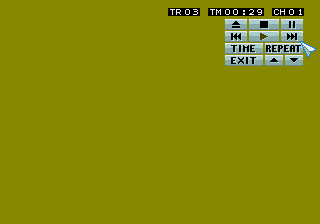
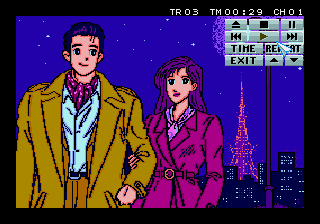
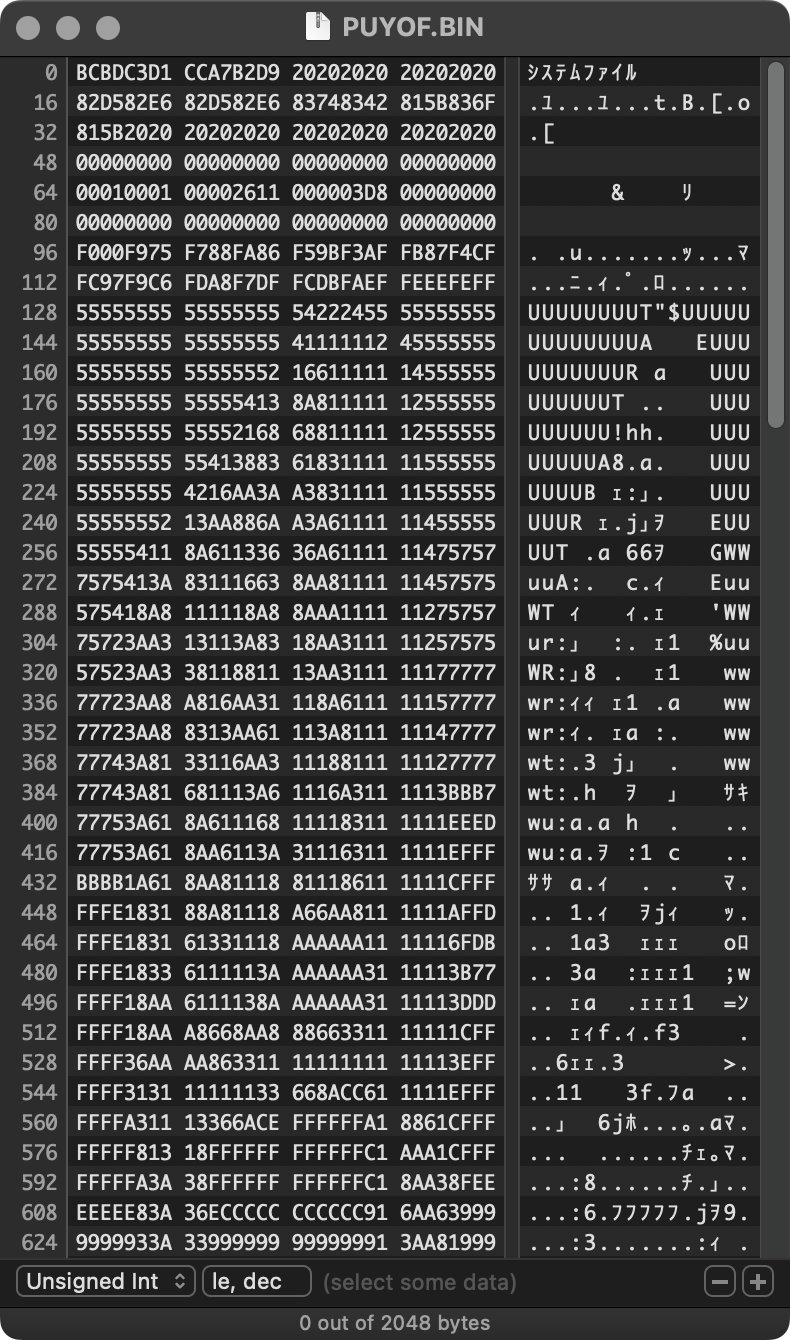

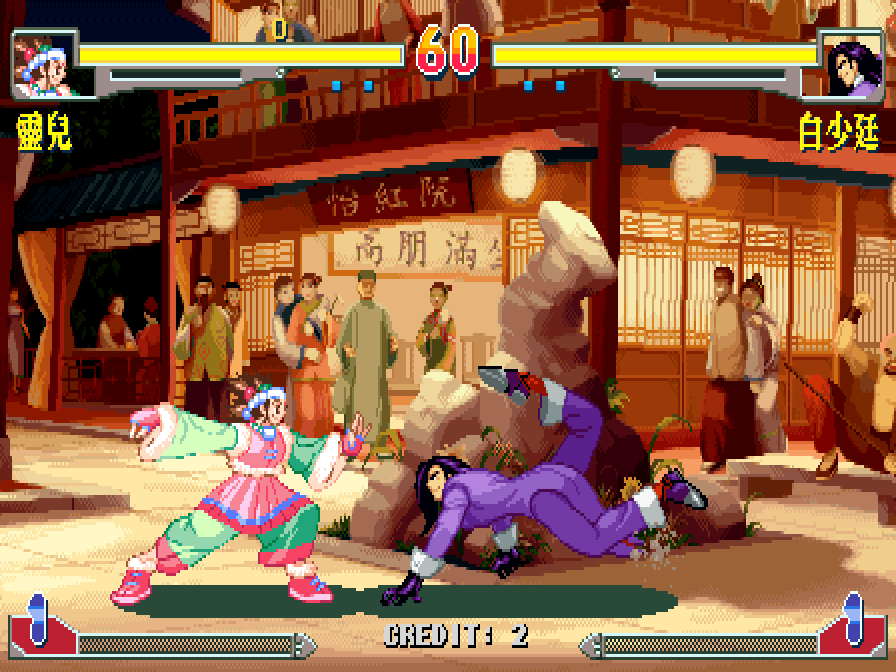
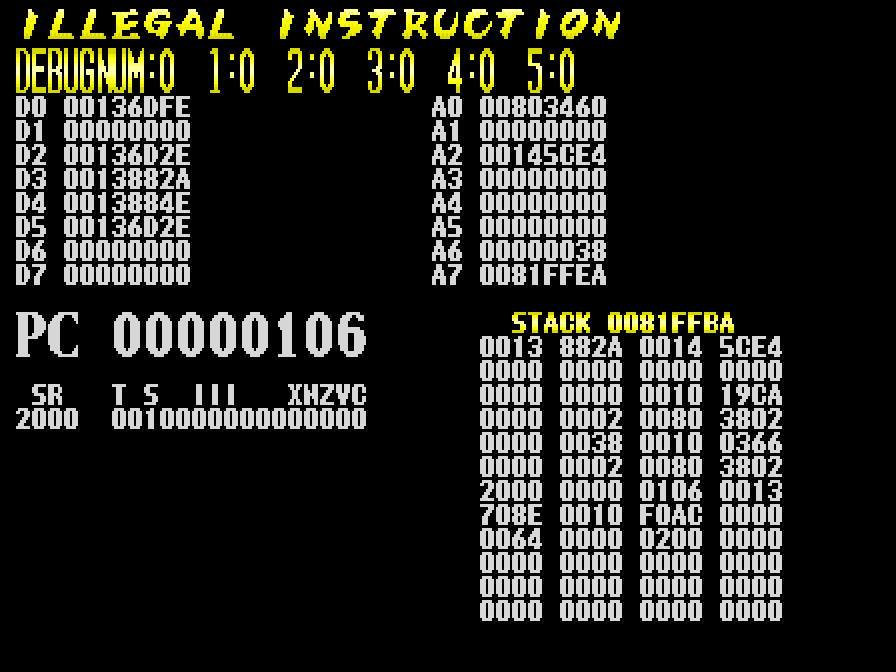
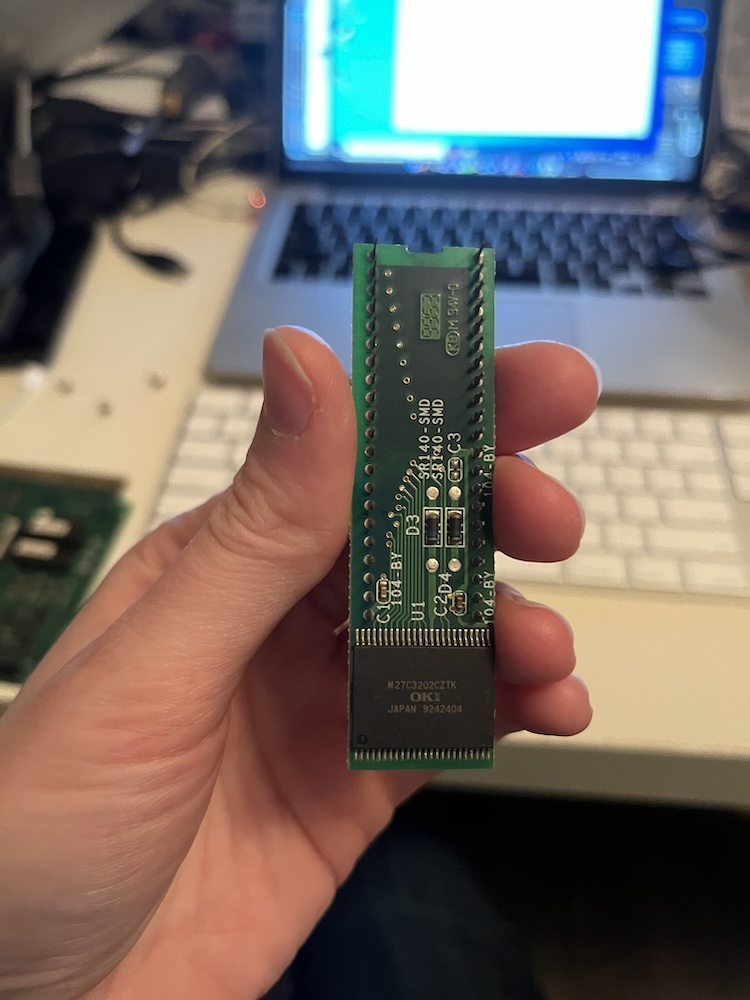
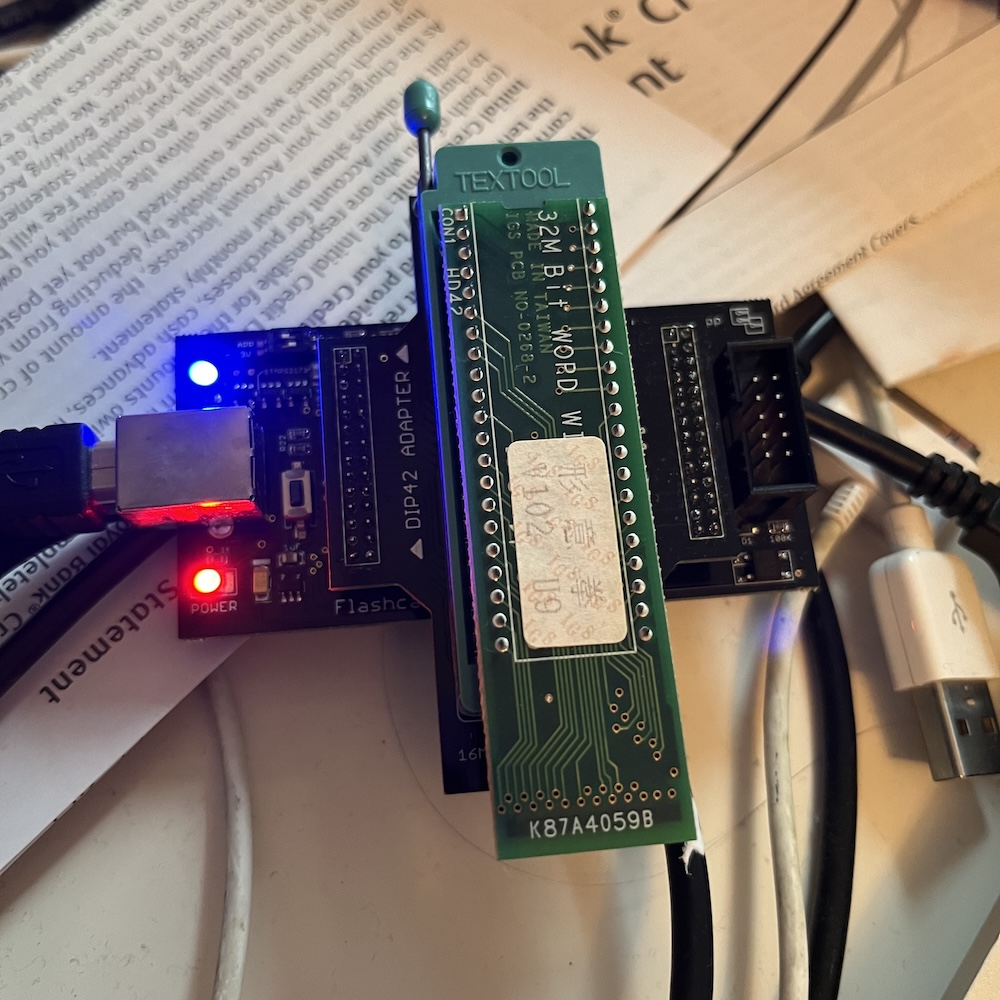
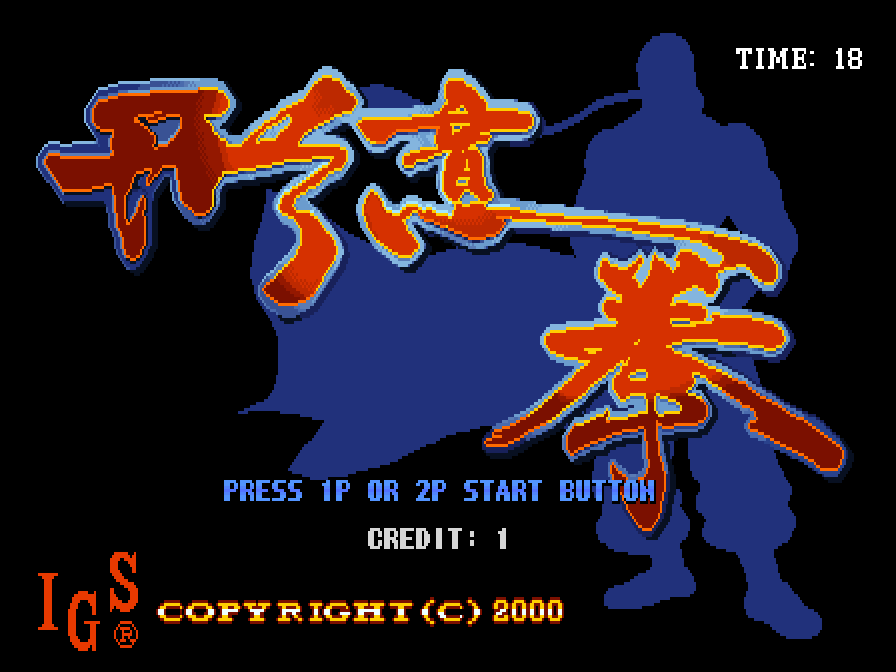

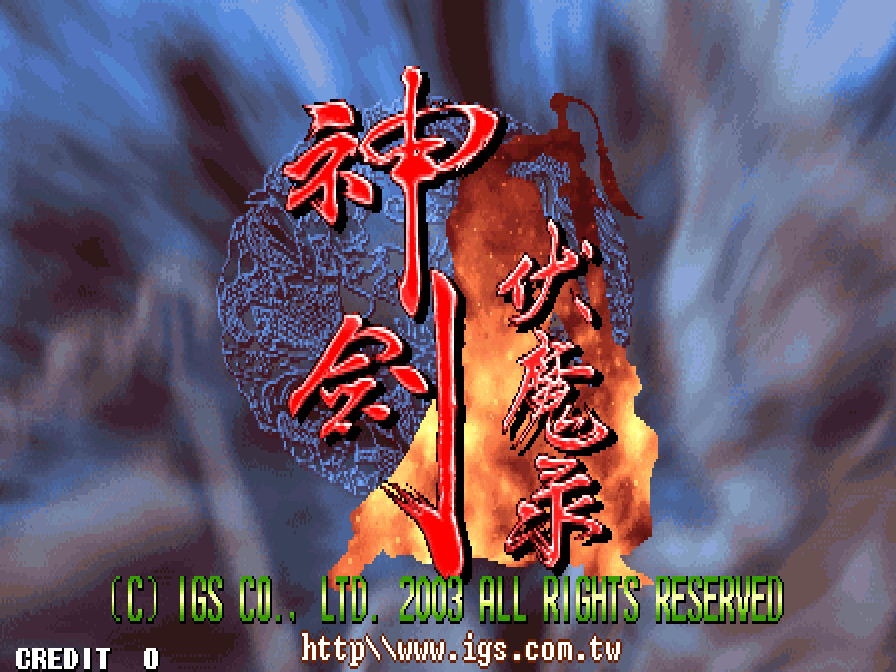
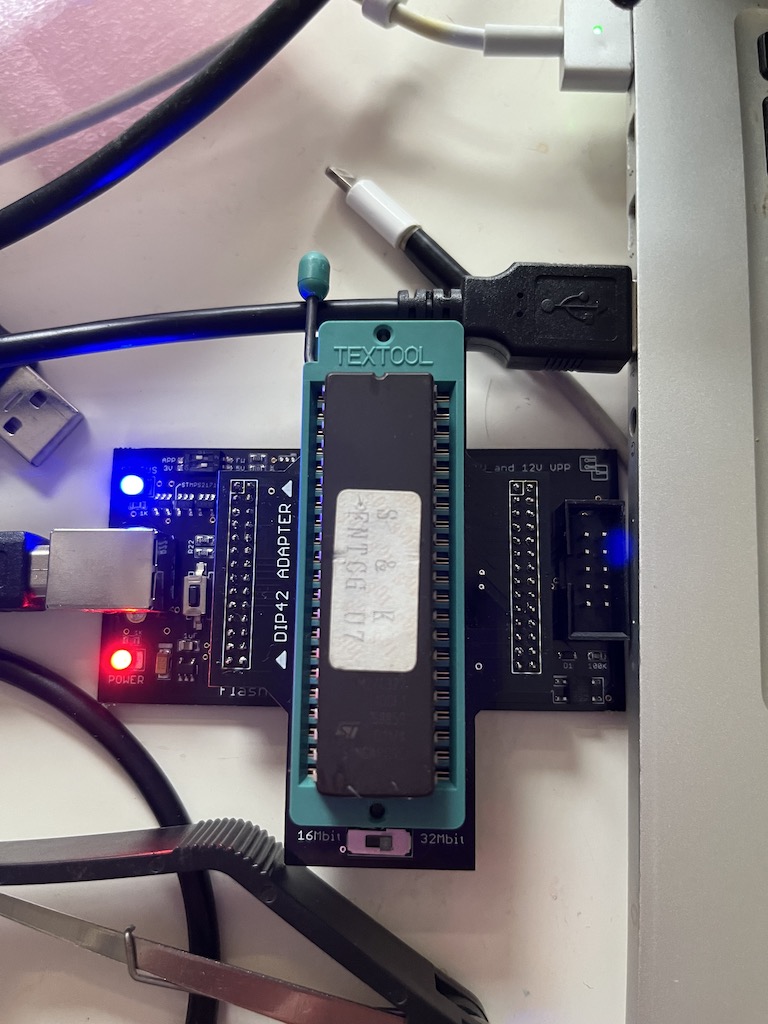
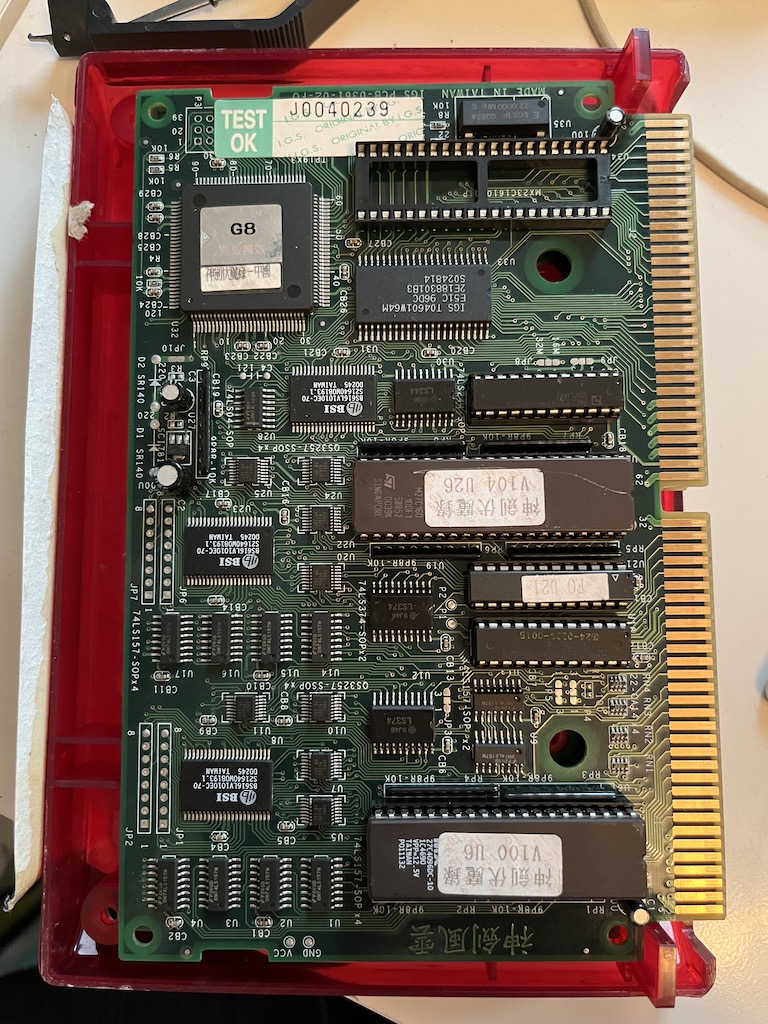




 First, to start with the good
  Unfortunately the quality of the sleeve itself is subpar. The cardboard feels thin and flimsy compared to other double-albums I own; it lacks weight. The gatefold hinge is also poorly-folded, and doesn’t stay closed on its own when the records are in; it flops open awkwardly. The records also don’t slide comfortably into the sleeve when the gatefold is closed, which makes putting records back after a play more awkward than it has to be. (See right: the record is inserted as far as it gets when the gatefold is closed. The black thing poking out is the inner record sleeve.) If you open the sleeve to insert the records all the way, then they can’t be removed while the gatefold is closed, which is even more awkward. The overall feeling is surprisingly cheap for a $35 album.
 Unfortunately, my copy shipped with large scratches on sides A and B. (See the photo on the left—the scratches are very visible at full size.) Both discs were also covered in dust fresh out of the package. Everything I’ve seen suggests this isn’t an isolated issue—I know other people whose iam8bit records shipped with scratches before the first play, and from scanning their twitter feed, it looks like this is a common complaint with other customers. Needless to say, this is a huge issue, and I’m shocked it’s as common a problem as it is with them.
 In 1999, an unofficial mod titled
 Via trial and error, and with help from information gleaned via the